Virtualization
Virtualization
to create independent execution environment, leveraging the abstract form of the hardware capability.
More Defi of Virtualization
- abstracts the hardware of computing infrastructure into several different execution environments.
- Creates the illusion that each separate environment is running on its own private computing infrastructure.
- Makes servers, workstations, storage, network, and other systems independent of the physical hardware layer.
- It is the fundamental technology for cloud infrastructure.
- Virtual resources can be started and stooped easily and quickly on demand.
Related concepts
- virtual machine (VM): an instance of a virtualized computing environment that behaves like a separate computer with its own OS, CPU, memory, storage, and network interfaces. A visual representation of a physical machine.
- hypervisor or Virtual machine monitor: A process that separates a computer’s operating system and applications from the underlying physical hardware.
- Hypervisor monitors and manages running virtual machines.
- host machine: the physical machine on which the virtual machine runs.
- guest machine: the virtual machine that runs on the host machine.
Virtualization types
The most important three types of virtualization:
- Network: the process of combining hardware and software network resources and network functionality into a single, software-based administrative entity, a virtual network
- Internal network virtualization: software switch, software router, software defined network(SDN)
- external network virtualization: VLAN, VXLAN
- Server: Full, partial, para (most popular on cloud)
- Storage: block-level, file-level
- pools physical storage from multiple network storage mediums to enable a single logical sotrage pool that is managed from a central console
Virtualization in Practice
Traditional server concept
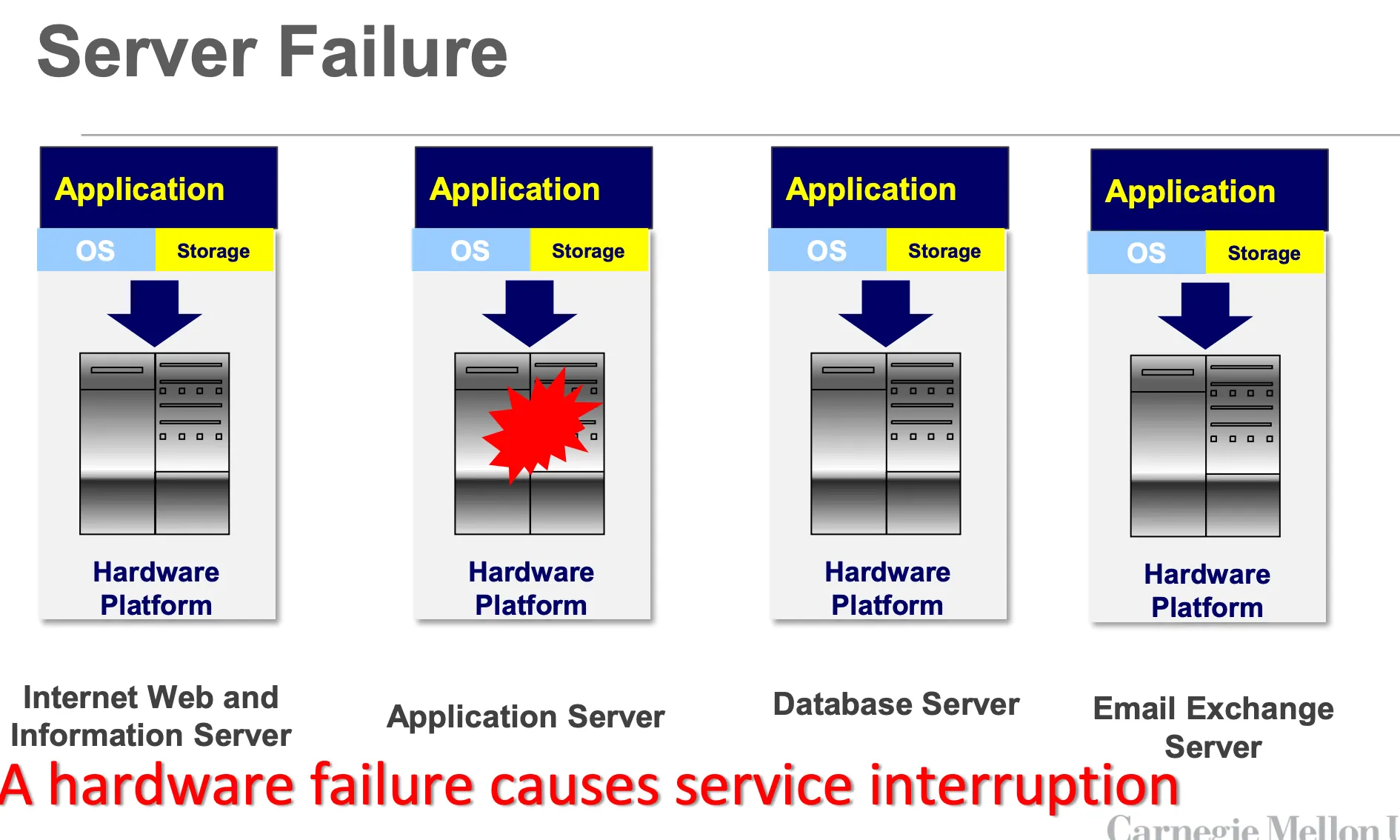
- Servers are viewed as an integral computing unit that each unit includes the hardware, OS, storage, and related apps.
- Servers are often identified and referred to by their functions
- File server, web server, database server, exchange server, etc.
- When current server is overloaded, we need to add more physical servers to share the load.
- In the pic below, which is a traditional server infrastructure, server is the combination of hardware and software(软硬件互相绑定)
- Disadvantages:
- Maintenance cost is high: acquisition and hardware repair cost
- Replication is challenging: redundancy is costly and difficult to implement
- Scalability is limited: physical resources are limited
- Highly vulnerable to hardware failure: single point of failure
- Often: Resource utilization is low
Virtual server infrastructure
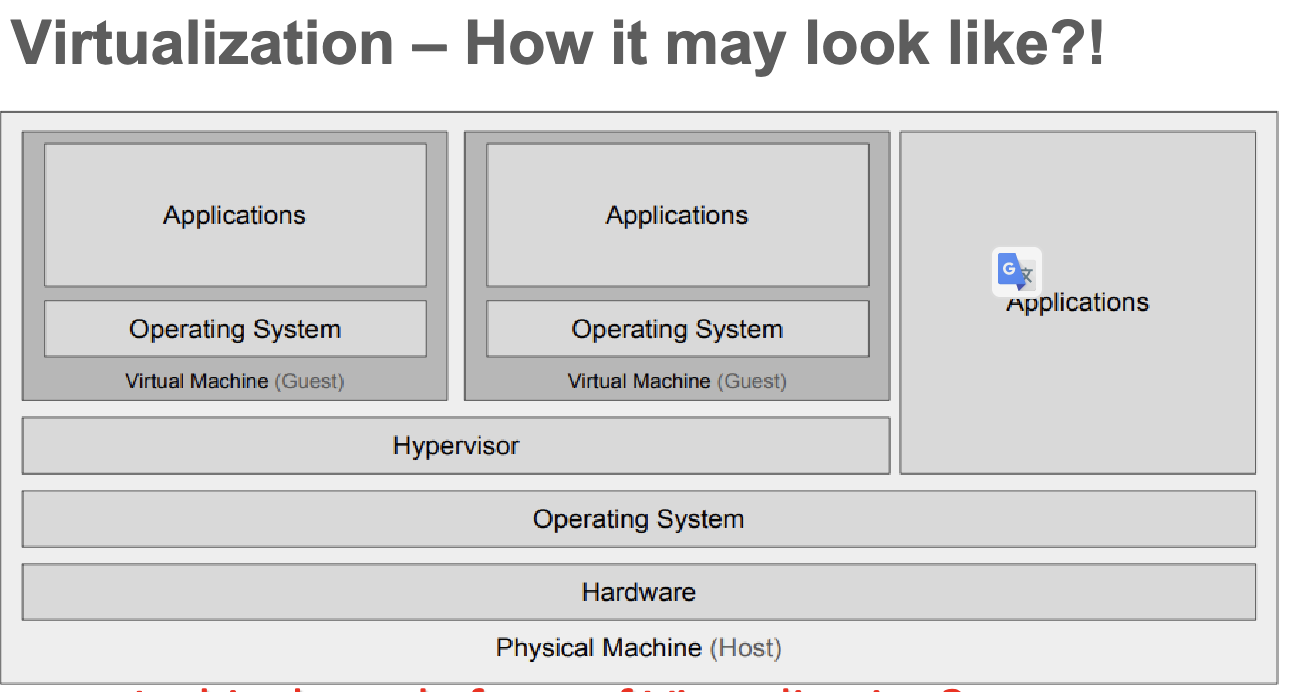
Server sprawl happens especially for on-promise and is the most threat for traditional server. To avoid this, we do virtualization. The difference with traditional server infrastructure is that here the server is decoupled from the hardware. We add a new layer between {app, OS, storage} and hardware, which is the virtualization(hypervisor) layer.
- Server virtualization enable server Consolidation and Containment
- Eliminating “server sprawl” via deployment of systems as “virtual machines” that can run safely and move transparently across shared hardware
- A virtual server can be serviced by one or more hosts, and one host may house more than one virtual server.
- This results in increased server utilization rates: from 5-15%, for traditional servers, to 60-80%
- Virtual servers can still be referred to by their function i.e., email server, database server, etc.
- If the environment is built correctly, virtual servers will not be affected by the loss of a host.
- Hosts may be removed and introduced almost at anytime to accommodate maintenance.
- Virtual servers can be scaled up and down easily.
- Server “cloning” can be easily achieved
- Multiple, identical virtual servers can be easily created based on server templates
- Virtual servers can be migrated from host to host dynamically, as needed.
Virtualization advantages
- Resource optimization that would result in reducing hardware, power and space requirement.
- Virtualization allows for the quick deployment, migration, and replication of VMs
- Support for Legacy Systems: Virtualization allows legacy applications to run in a modern cloud environment without requiring significant changes to the underlying infrastructure
- Better automation.
Hypervisors
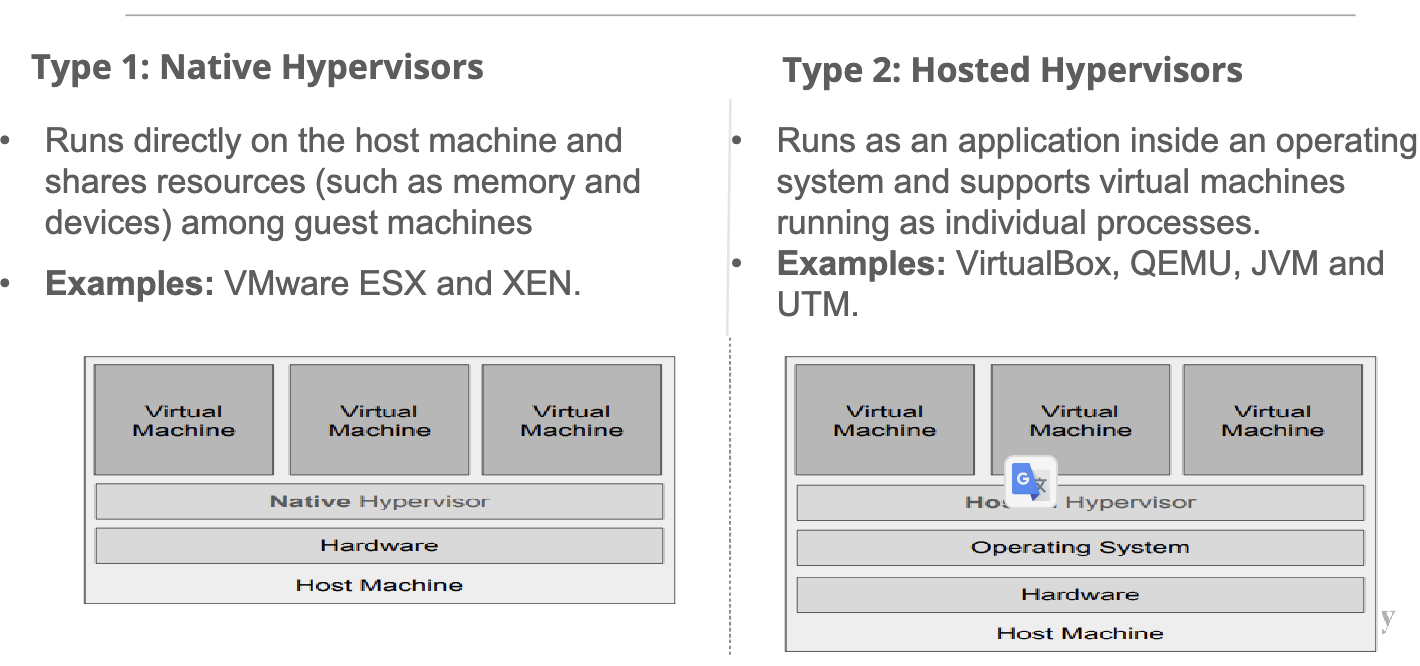
- Type 1 native hypervisor(bare-metal): runs directly on the host’s hardware to control the hardware and to manage guest operating systems. Examples: VMware ESXi, Microsoft Hyper-V, Xen
- Type 2 hosted hypervisor: runs as an application on a conventional operating system and supports virtual machines running as individual processes. Examples: VMware Workstation, Oracle VirtualBox, QEMU, JVM, UTM
Last modified on 2025-11-22