Infrastructure as Code
- Definition: Write and execute code to define, deploy update, and destroy our infra.
- Why we automate deployment? reliable, efficient, repeatable, safe releases, multiple environment, maximum scalability
Types of IaC tools
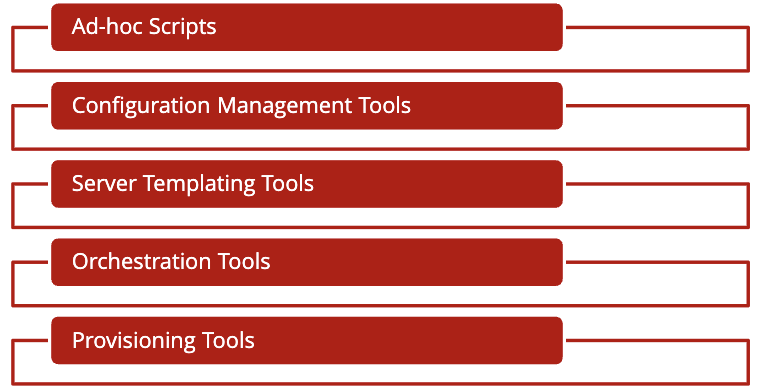
Ad-hoc Scripts
- The easiest and most straightforward approach of automating anything
- ad-hoc tools run on single core tool, like cloud shell, which connects to a VM with only 5GB storage space, if you need more, you have to upload the file to cloud bucket or sth, and use the shell to read from it.
- examples : Bash, Ruby, Perl
Configuration Management Tools
- Designed to install and manage software on existing servers.
- These tools offer coding conventions and ability to run scripts on multiple servers.
- ansible assumes the multiple servers that you use work in completely the same way with same hard tool structure. In these cases, even though the servers are of the same, some external small errors, like a sudden network error, cause the machines to diverge in some way, like having different file system structure.
- Examples: Chef, Puppet and Ansible.
Server Templating Tools
- The idea of server templating tools is to create an image of a server that captures a fully self-contained “snapshot” of the operating system (OS), the software, the files, and all other relevant details.
- Examples: Docker, Packer, Vagrant
Provisioning Tools
- Most advanced IaC tools.
- Provisioning tools are responsible for creating these servers, rather than running software or scripts on top of existing servers like other categories.
- You can use provisioning tools to create databases, caches, load balancers, queues, network configurations and SSL certificates.
- Examples: Terraform, CloudFormation, OpenStack Heat, and Pulumi, actively deal with hardware
Orchestration Tools
We mentioned previously. Orchestration tools are responsible for managing the lifecycle of containers, including deployment, scaling, and networking.
IaC Tool Comparison
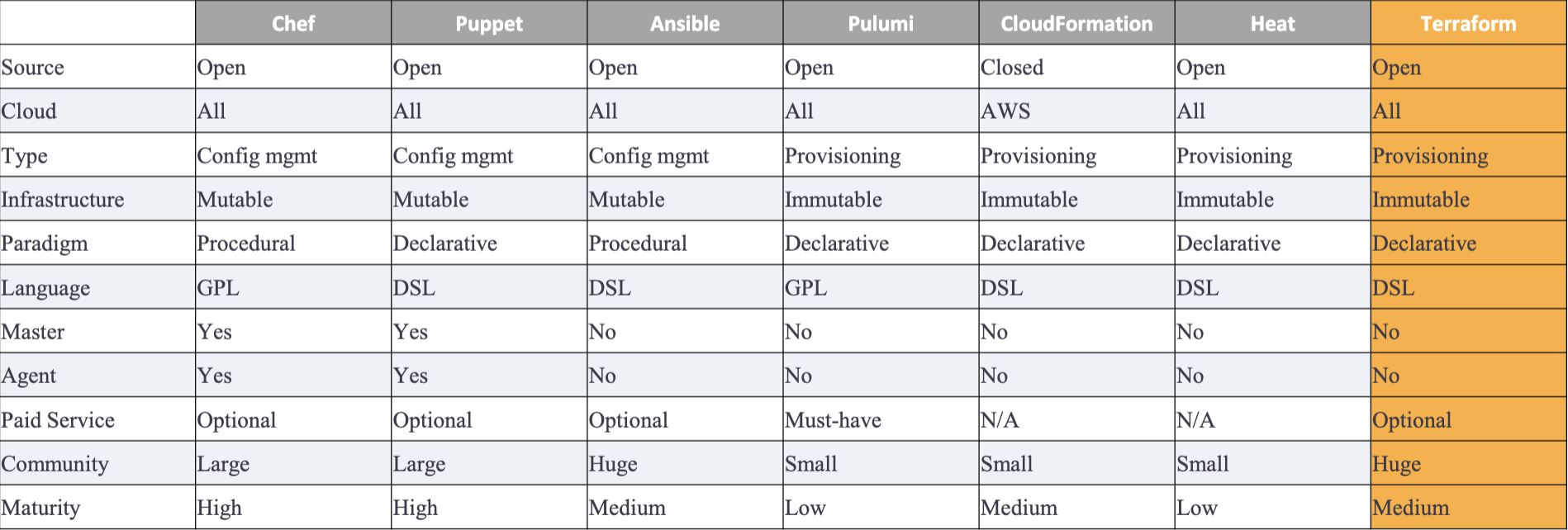
Mutable vs. Immutable
- Mutable: Configuration management tools (e.g., chef, puppet) default to a mutable infrastructure paradigm.
- like ansible & chef where there is possible mutation to the softwares like the network error mentioned above that causes the infra to diverge between machines.
- Over time, each server becomes slightly different than all the others, leading to subtle configuration bugs that are difficult to diagnose and reproduce.
- Immutable infrastructure tools don’t allow this deviation to happen.
Declarative vs. Procedural
- In Procedural scripting style, developers will code the application flow in step-by-step commands that does not care about the outcome or the final state, but just complete the preset steps. e.g. chef and ansible
- In Declarative scripting style, developers will write code that specifies their desired end state, and the IaC tool itself is responsible for figuring out how to achieve that state.
- e.g. 5 servers, 3 firewall connections, 1 SSL certificate, IaC tool is responsible for figuring out how to achieve these goals. E.g. Terraform, CloudFormation (provisioning), puppet(config management)
General Purpose vs. Domain-specific
DSLsare designed for use in one specific domain, whereasGPLscan be used across a broad range of domains.GPLExamples: Chef supports Ruby; Pulumi supports a wide variety of GPLs, including JavaScript, TypeScript, Python, Go, C#, Java, and others.DSLExamples: Terraform uses HCL; Puppet uses Puppet Language; Ansible, CloudFormation, and OpenStack Heat use YAML (CloudFormation also supports JSON).
Master vs. Masterless
- In Master-centered infrastructure tools, you should dedicate a server to run the IaC tool (e.g., Chef, Puppet).
- Every time you want to update something in your infra, you use a client (e.g., a command-line tool) to issue new commands to the master server, and the master server either pushes the updates out to all the other servers or those servers pull the latest updates down from the master server on a regular basis.
- In masterless infrastructure tools, tools don’t require a Master or rely on a master server that is part of the existing infra.
- For example, Terraform communicates with cloud providers using the cloud provider’s APIs, so in some sense, the API servers are master servers, except that they don’t require any extra infrastructure or any extra authentication mechanisms (i.e., just use your API keys).
Agent (k8s) vs. Agentless
- Some IaC tools require the installation of agent software on each node you need to configure. The agent typically runs in the background on each server and is responsible for installing the latest configuration management updates.
- This introduces a security concern since you need to open the outbound port for the agent to communicate with the master server
Community Support
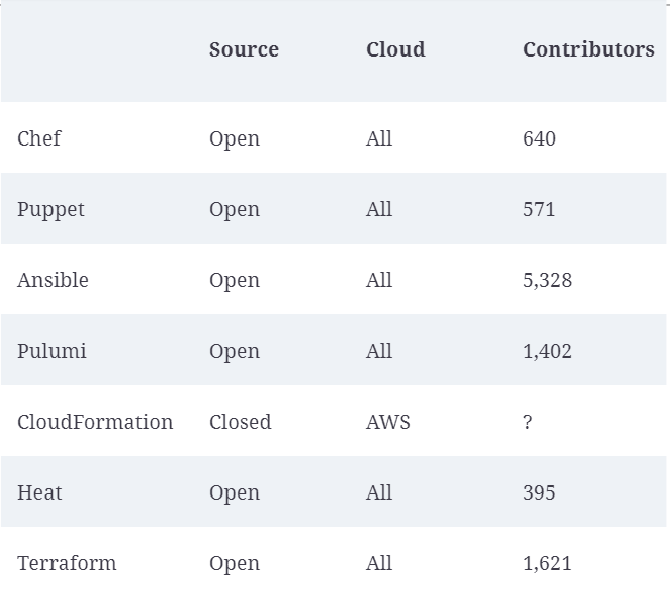
Terraform
- An open-source IaC provisioning tool created by HashiCorp and written in GO Lang.
- script automatically detects the environment it is running on (GCP, AWS, etc) and install the corresponding libraries and use a hash map to map the compatible APIs.
- Good readability, can deploy to K8s, declarative, paves the way for massive scalability, Management of infrastructure will be automated, Source of truth for the infra
HashiCorp Configuration Language (HCL)
- The most basic construct is called a
block, defined as a “container for other content”. - The body of the block is nested with {}
- Each block has a type (e.g., resource)
- Each block is identified using labels, the number of labels is identified based on the block type
Block types

- Resource block: most popular; to create components of your infra, like VM instances, databases, and networking components.
- Provider block: to define the cloud provider (e.g., AWS, GCP, Azure) that you want to use to host and deploy your resources. Terraform decides which mapping table to download based on the cloud provider.
- Variable block: to define input variables that can be used to parameterize your Terraform configuration.
- Output block: exposes information about specific resources created in your configuration.
- Provisioner: To execute a script after your resources have been created. It waits for your service to be deployed successfully and then run some codes.
- Local: To create local variables within a specific resource block
Workflow
A basic Terraform workflow consists of the following two steps:
- Initialization: using
terraform init. Install libraries, binaries executable, for the providers that you have listed in your code. The mapping tables, provider apis, etc. All stored in.terraformfolder.- You must initialize Terraform every time you write a new configuration file.
- Execution.
- Plan: a log file stored in CI/CD pipeline, keep track what will happen by comparing what we currently have and what we will do (add, delete, change in the current infrastructure).
- Apply: Once you have confirmed that the plan does what you intended, then execute the plan and Terraform will provision the cloud resources.
- destroy: to remove all resources created by Terraform. Don’t do it by yourself. 解铃还须系铃人
Naming conventions
- Terraform does not care about filenames. It combines all files with the
.tfextension and then creates an execution plan using all the configurations. provider.tf: contains the provider block declaring provider, which is a translation layer between Terraform and the external API of the provider.variables.tf:-
- create all the input global variables you required in your project.
- Variables are referenced using the
var.<variable_name>. - When apply it will scan our code to identify what variables or parameters are missing.
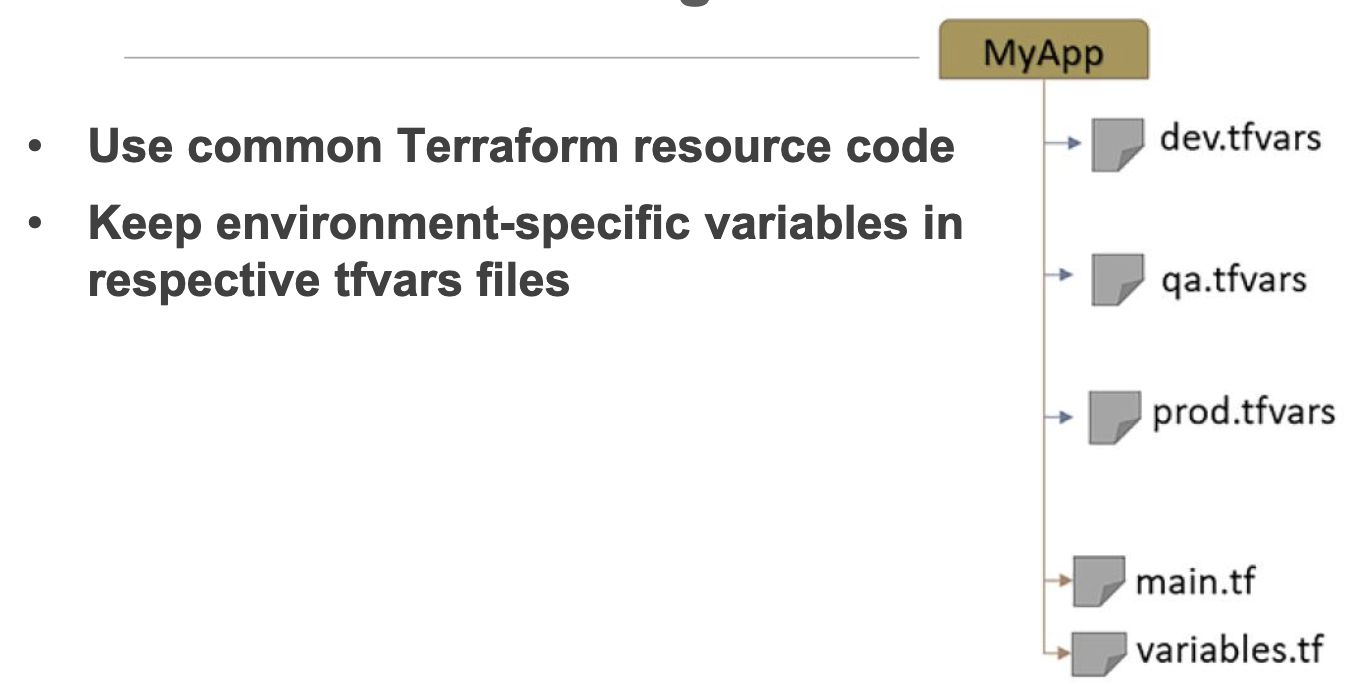
- You can create default values in terraform.tfvars
-
startup.sh: a bash script that will be executed after the resource is created.outputs.tf: contains all the output blocks that expose information about specific resources created in your configuration.main.tf: contains all the resource blocks that define the actual components of your infrastructure. Actual creation of the resource blocks.terraform.tfvars: There are multiple ways to assign a value to a variable, either through a default value in the declaration or pass it as a value either interactively or via the command-line flag. One common way is to create a file namedterraform.tfvarsthat contains the variable assignments. You can then use them asvar.<variable_name>in your code.
Configuration Structure
State
- A Terraform configuration is a declaration of the desired state, and When you run
terraform apply, Terraform determines the difference between the actual state and the desired state - Terraform state is the file that tracks the current actual state of your infra, containing all the configurations that have been applied during the Terraform workflow
- By default, it is named as
terraform.tfstateand stored in the current/same directory as your configuration files. - If working in a team, it’s encouraged to store the Terraform state file remotely. To enable collaboration, Terraform allows remote storage of the state file using the concept of state backends.
- Conventionally, use
backend.tffor the filename with example content below:-
terraform {
  backend "gcs" {
    bucket = "<PROJECT_ID>-tf-state"
    prefix = "backend"
  }
}
-
prefixrefers to a folder on the bucket that will host the state file
Commands
terraform state list: list all resources in the state fileterraform state show <resource_name>: show detailed information about a specific resource in the state fileterraform state rm <resource_name>: remove a specific resource from the state file without deleting the actual resource in the cloud provider
If you made some manual changes to the resource after deployment:
terraform plan -refresh-only: to visualize the difference between the Terraform state and the real infraterraform apply -refresh-only: to update the state file to match the real infra according to the prev plan output without making any changes to the actual resources on the cloud- Update the TF configuration file to set the same value as the manually modified value. So, if TF commands are reapplied, it won’t override the manually entered values.
Meta-argumesnt
Meta-arguments are special constructs in Terraform to enable you to write efficient Terraform code. Examples of Meta-arguments:
-
provider meta-argument
- You can write as many providers as you want in the
provider.tffile. Try to keep only relevant providers in the same provider.tf file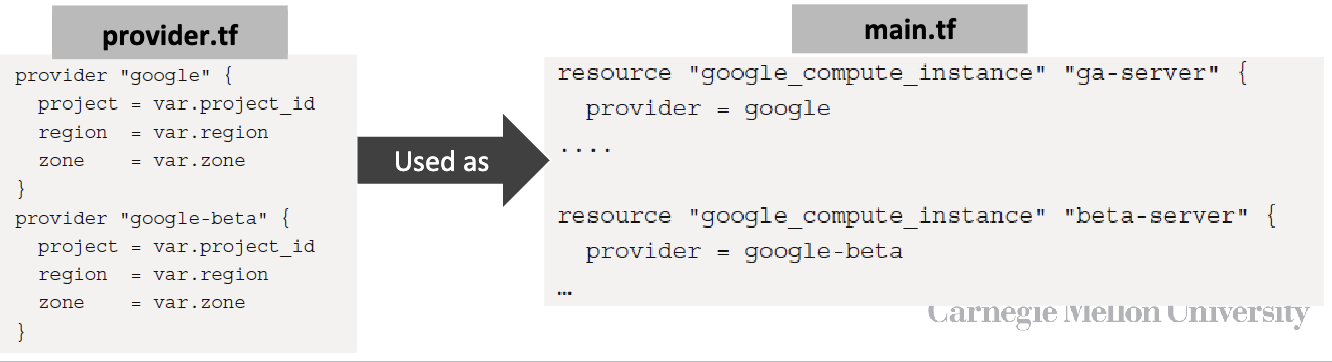
- You can write as many providers as you want in the
-
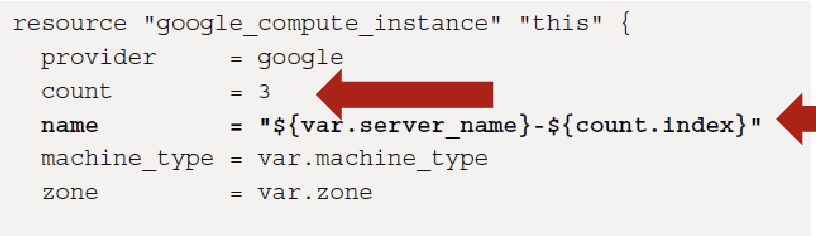
count meta-argument: provides the capability to create identical resources in a single block.
-
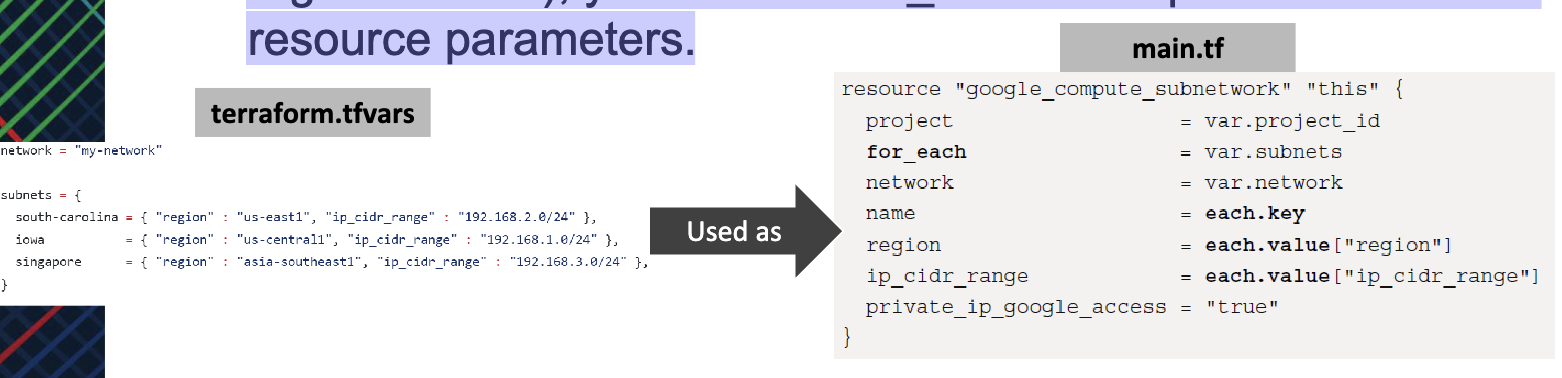
for_each meta-argument: If you want to create resources that share some attributes but have different attributes (e.g., worker nodes on different regions/zones), you can use for_each to map list of values as resource parameters.
-
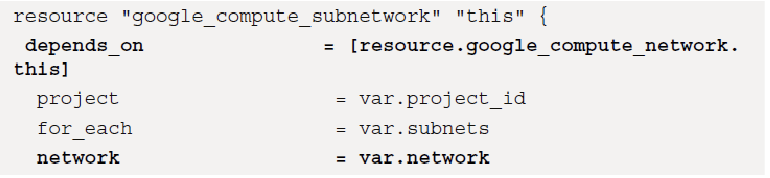
depends_on meta-argument: By default, Terraform runs 10 resource operations in parallel. If you have a resource that can’t be created until another resource is created (e.g., instance using a specific subnet), then use depends_on meta-argument.
Resource Reference “this”
- In GCP, every resource can be uniquely identified, so it is good practice to refer to resources using
**this**reference, which is a Unique IDentifier(UID) containing additional information about the resource. - You can use
thiswith any resource and refer to it in other resources. It provides a clear and widely understood convention for identifying the primary resource within a module. - When a module is designed to be generic and reusable, “this” can provide a consistent naming scheme across different implementations.
Last modified on 2025-11-28