Why Spark
- Hadoop is not that efficient as it is designed for Commodity Hardware while apache spark is designed for more expensive infra with better performance.
- Performance: MapReduce only supports
- Full dump of intermediate data to disk between jobs
- No data sharing between jobs
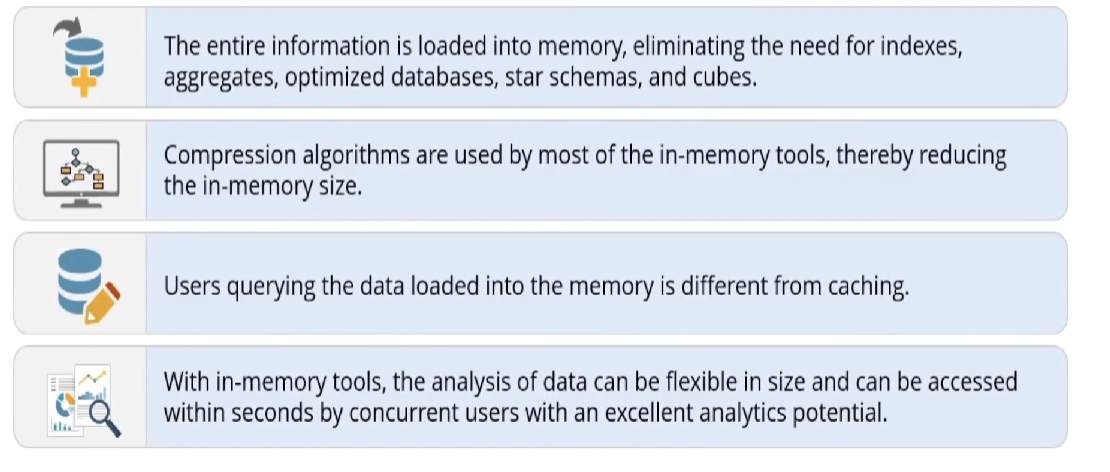
While Spark supports In-memory processing,
benefits:
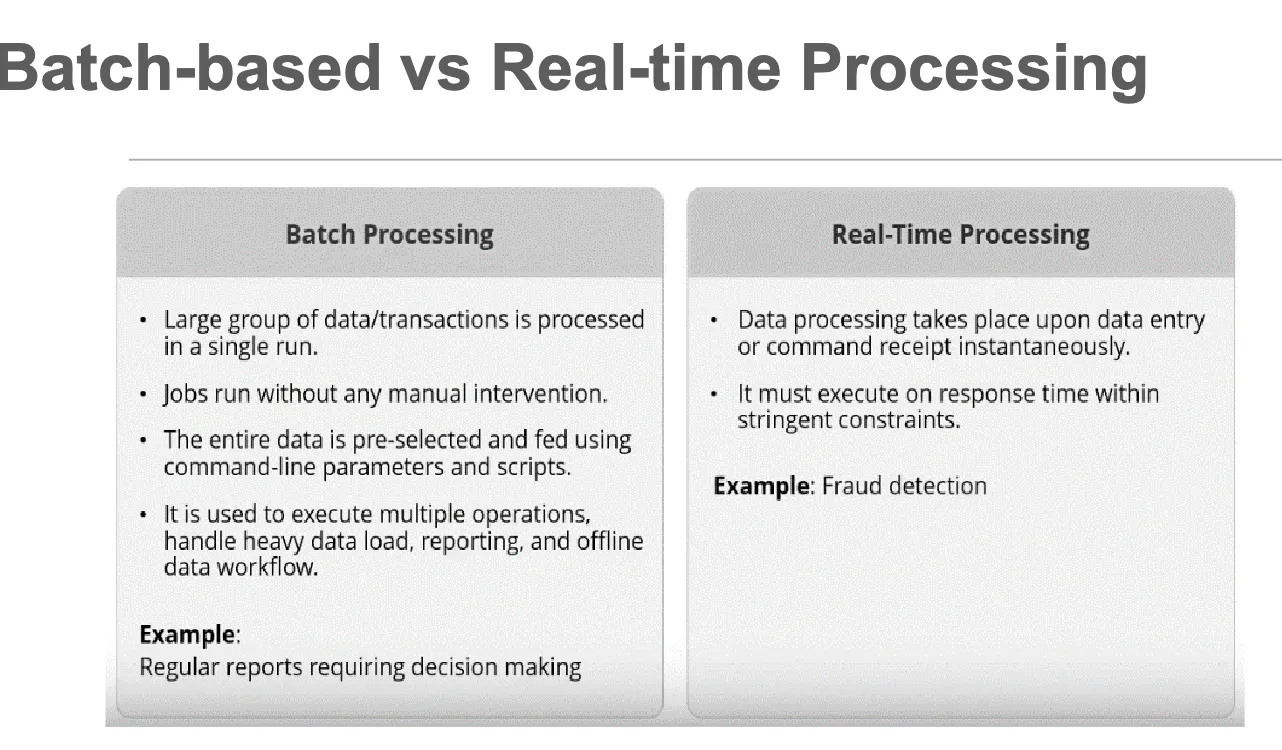
- MpReduce only supports batch mode
Spark
Basics
- Apache Spark is a fast and general-purpose cluster computing system for large scale data processing.
- Spark was originally written in Scala, which allows concise function syntax and interactive use.
- Scala is a type-safe Java Virtual Machine language that incorporates both object oriented and functional programming into an extremely concise, logical, and extraordinarily powerful language.
- Apache Spark provides High-level APIs in Java, Scala, Python (PySpark) and R.
- Apache Spark combines two different modes of processing:
- Batch-based Processing which could be provided via Apache Hadoop MapReduce
- Real-time Processing which could be provided via Apache Storm.
- Spark is run on CPU, and it can be used on GPU using
Nvidia dgx sparkwithRAPIDSaccelerator.
Ecosystem
Engine
Lightning fast cluster computing
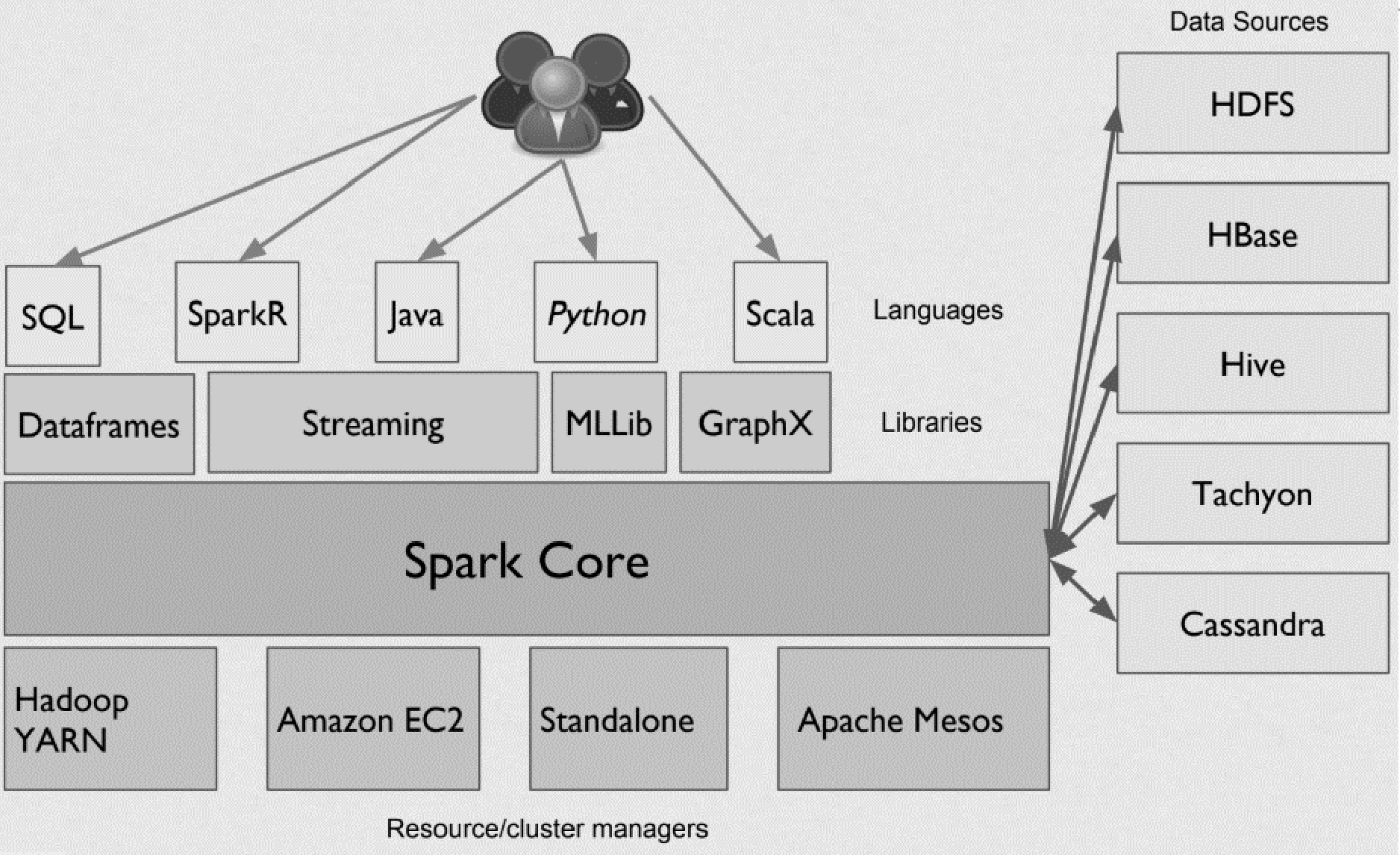
Spark Core is the general execution engine for the Spark platform that other functionalities are built on top of it. Spark has several advantages:
- Speed: Run programs up to 100x faster than Hadoop MapReduce in memory, or 10x faster on disk
- Ease of Use: Write applications quickly in Java, Scala, Python, R
- Generality: Combine SQL, streaming, and complex analytics
- Runs Everywhere:
- Spark runs on Hadoop, Mesos, standalone, or in the cloud
- It can access diverse data sources including HDFS, Cassandra, HBase, and S3
Why Fast?
Advanced DAG (Directed Acyclic Graph) execution engine
- It aims to rearrange and combine operators where possible to get the optimum performance
- i.e., Map-then-Filter will be rearranged to Filter-then-Map
In-memory distributed computing
- It avoids disk writes and reads
- It is achieved by the Resilient Distributed Datasets (RDDs)
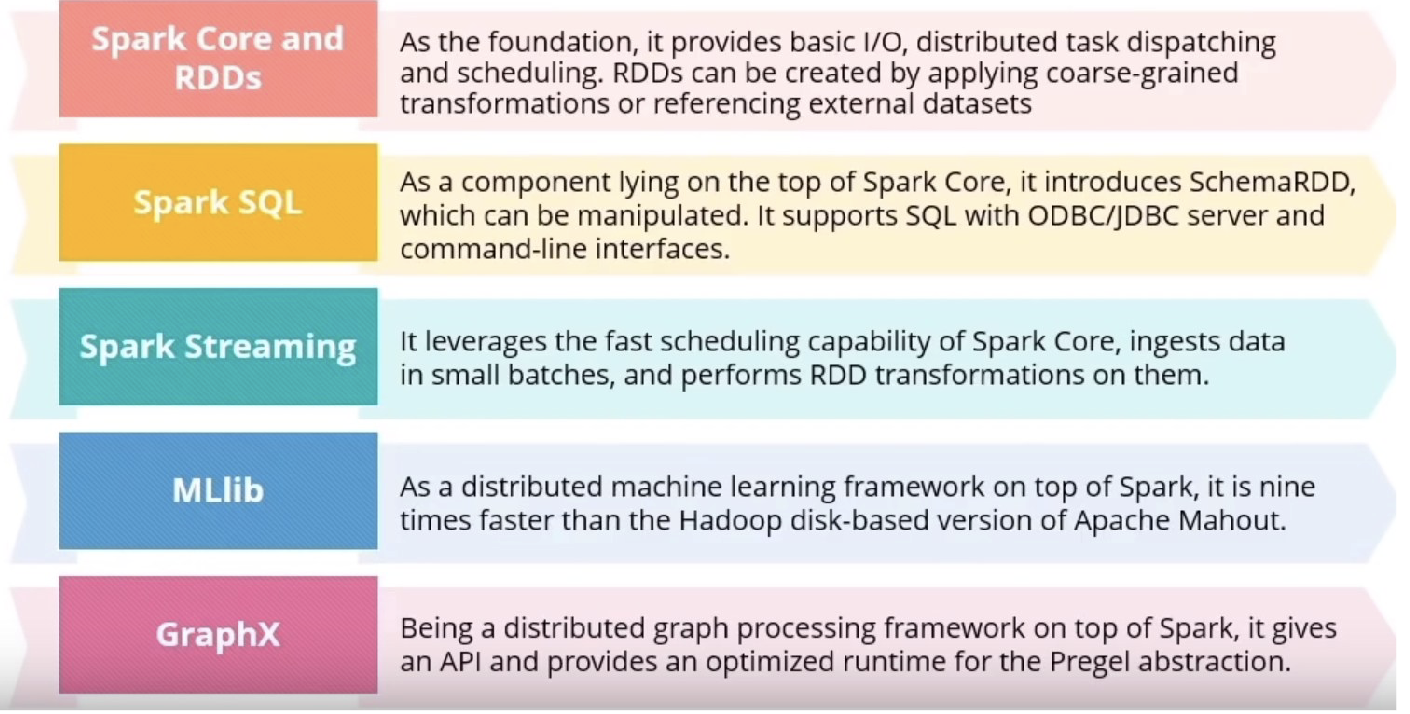
Components
Resilient Distributed Datasets (RDDs)
Definition
- A distributed collection of objects across a cluster with user- controlled partitioning & storage
- The Spark’s core abstraction for working with data
- Resiliency: capable of automatically rebuilding on failure
- Each RDD contains lineage information (how it is built)
Properties
- RDDs shard the data over a cluster, like a virtualized, distributed collection (analogous to HDFS)
- RDDs support intelligent caching, which means no naive flushes of massive datasets to disk.
- This feature alone allows Spark jobs to run 10-100x faster than comparable MapReduce jobs!
- The “resilient” part means they will reconstitute shards lost due to process/server crashes.
- RDD is partitioned across multiple nodes. So, while the use of Spark will abstract away a lot of this partitioning from us, we need to know that RDDs will, in fact, be stored across the nodes in the Spark cluster.
- Spark RDDs are immutable.
- Spark RDDs are resilient, that is, even if one of the nodes on which the RDD resides crashes, then it can be reconstructed using its metadata.
- Any operation which we specify on a Spark RDD will generate a new RDD with those modifications applied. So RDDs cannot be modified or updated without the operations resulting in the creation of new RDDs with updated data.
Programming
Lambda function: anonymous + lambda x avoids null or illegal input
- Example 1: Spark WordCount:
    import sys
    from pyspark import SparkContext, SparkConf

    conf = SparkConf()
    # create Spark context with necessary configuration
    sc = SparkContext.getOrCreate(conf=conf)
    # Conduct MapReduce and write the output to folder
    wordCounts = sc.textFile("/testData").flatMap(lambda line: line.split(" "))\
        .map(lambda word: (word, 1)).reduceByKey(lambda a,b: a + b).saveAsTextFile("/output")
- Example 2: count the most frequent words:
- first turn the word list into key-value with each value assigned to 1
- reduce the key-value pairs such that count the appearances: reduceByKey
- flip the relationship to value-key pair → sortByKey
- overall:
results_rdd = lines_rdd.flatMap(lambda x: x.split()).map(lambda x: (x,1))
                        .reduceByKey(lambda x,y: x+y)
                        .map(lambda x: (x[1],x[0])).sortByKey(False)
Flexible Deployment
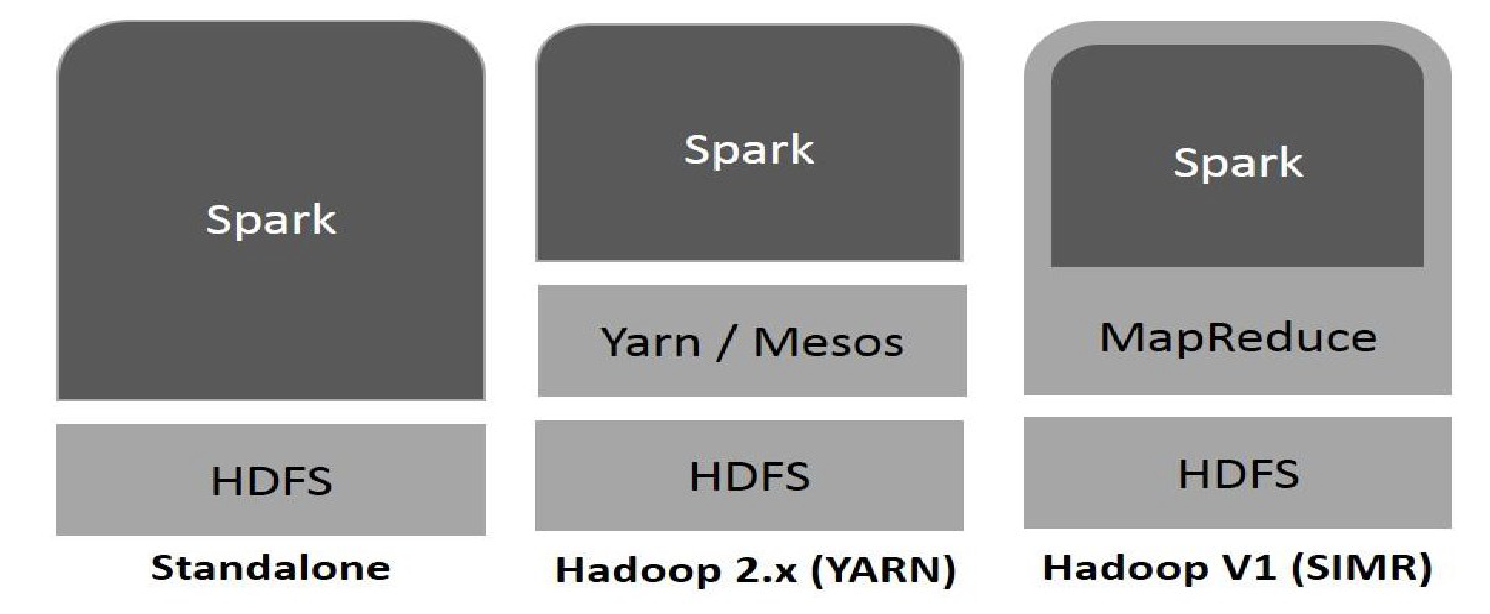
Spark Context
SparkContext represents a Spark cluster’s connection that is useful in building RDDs and broadcast variables on the cluster.
- It enables your Spark Application to connect to the Spark Cluster using Resource Manager.
- Before the creation of SparkContext, SparkConf must be created
In earlier versions of Apache Spark 1.x, Spark RDDs were the major APIs. However, Spark RDDs require a lot of low-level coding and you need much manual coding.
- As a result, later versions were released to encapsulate Spark RDDs into higher-level APIs, called Spark Dataframes.
Spark Dataframes
A history:
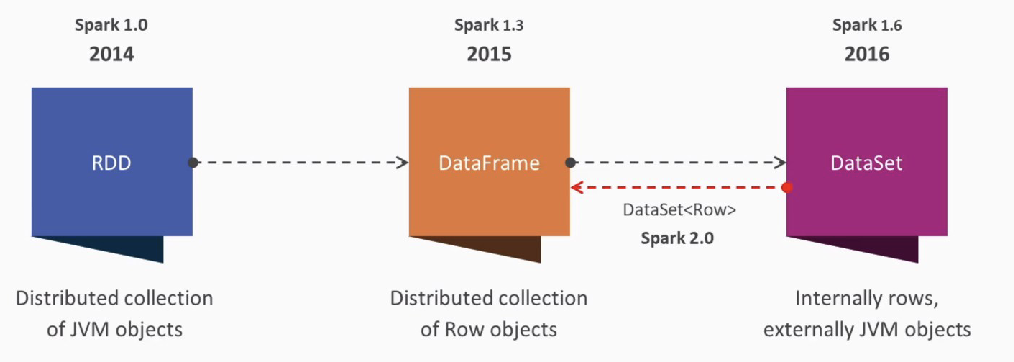
Advantages of Spark Dataframes over RDDs:
- At the minimum level, Spark still uses RDDs, but Dataframe API allows a much simpler interface to interact with the data, as well as providing a more natural look and feel, especially with people familiar with relational databases.
- Spark Dataframes are like distributed in-memory tables with named columns and schemas, where each column has a specific data type: integer, string, array, map, real, date, timestamp, etc. To a human’s eye, a Spark DataFrame is like a table
- Dataframes can be constructed from a wide array of sources, such as structured data files, tables in Hive, external databases or existing RDDs.
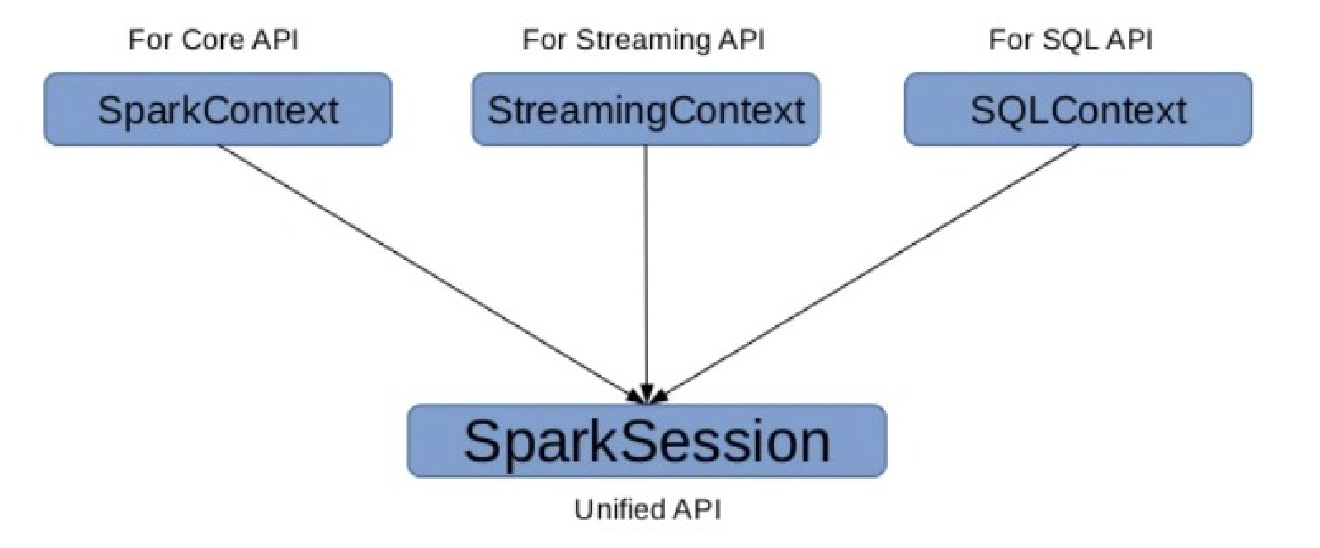
Spark 2.x Entry Point
Architecture
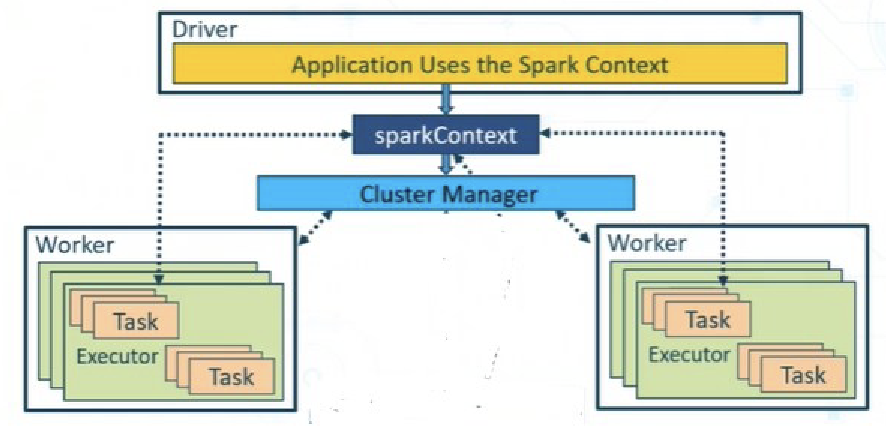
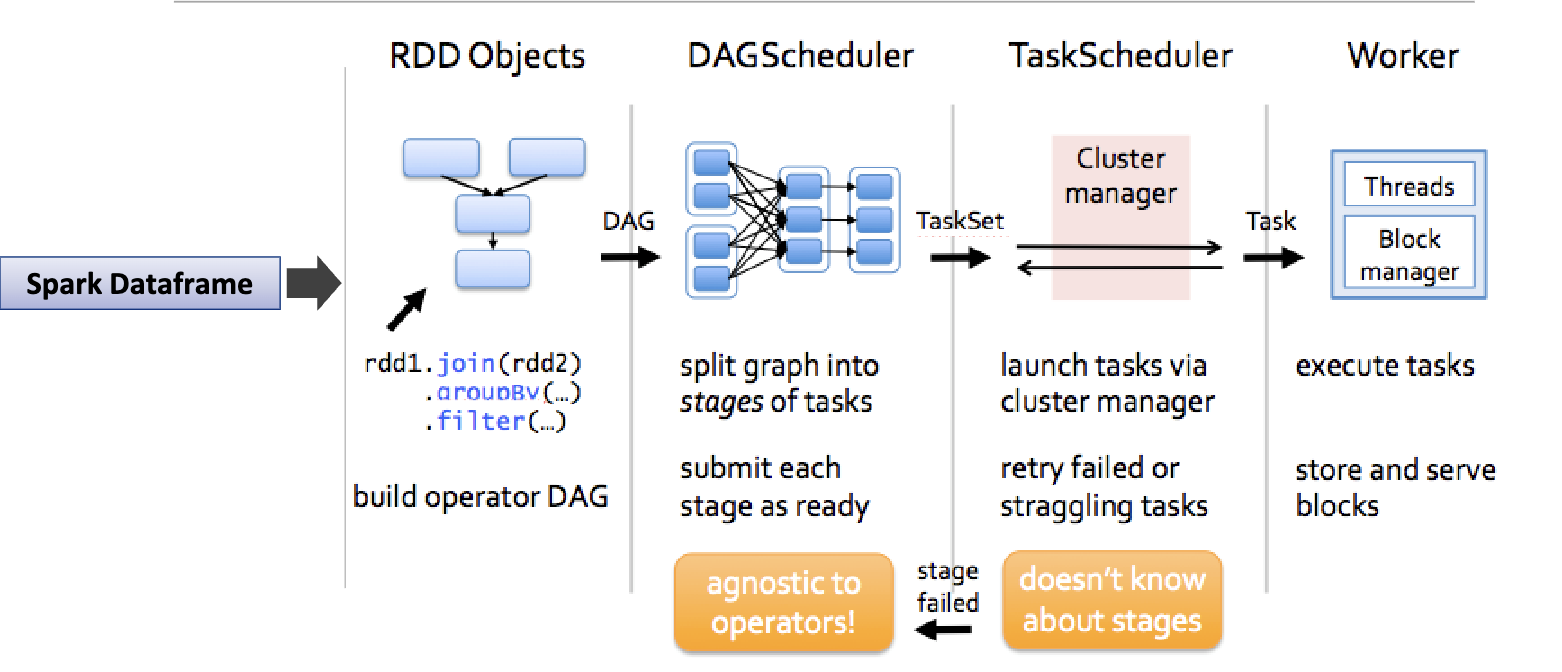
- First, there is a driver, which is an application that uses the SparkContext.
- In Spark 2.x, SparkSession was created to encapsulate SparkContext functionalities
- The
SparkContextthen refers to a Cluster Manager to interact with the various Workers. - Each Worker consists of one Executor and one or more Tasks.
- It is the responsibility of the driver program to communicate
Run a Job
import pyspark
from pyspark import SparkContext, SparkConf, SQLContext
from pyspark.sql import SparkSession

spark = SparkSession.builder \
    .appName("HW7_spark_session") \
    .getOrCreate()

print("Spark application name:", spark.sparkContext.appName)
print("Master: ", spark.sparkContext.master)
DataFrame Operations
Read/Write
The basic of reading data in Spark is through DataFrameReader. This can be accessed through SparkSession through the read attribute
from pyspark import SparkFiles
dataframe = spark.read.csv(SparkFiles.get("data.csv"), header=True, inferSchema=True)
# Or simply
dataframe = spark.read.csv("data.csv", header=True, inferSchema=True)
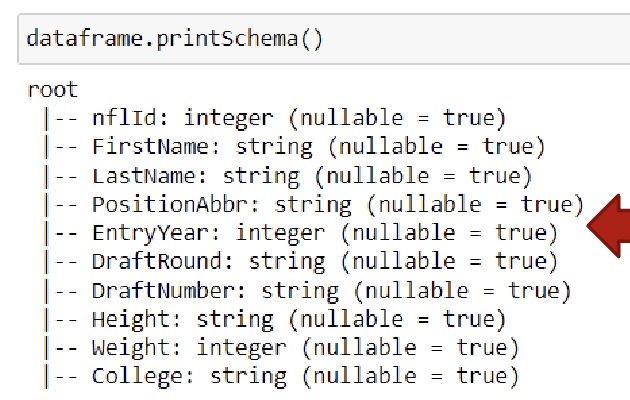
DataFrame Schema
Think about each dataframe as a table. The table MUST have a structure (e.g. column names and data types). In Spark, this structure is called Schema
Data Types
| Data type | Value assigned in Python | API to instantiate |
|---|---|---|
| ByteType | int | DataTypes.ByteType |
| ShortType | int | DataTypes.ShortType |
| IntegerType | int | DataTypes.IntegerType |
| LongType | int | DataTypes.LongType |
| FloatType | float | DataTypes.FloatType |
| DoubleType | float | DataTypes.DoubleType |
| StringType | str | DataTypes.StringType |
| BooleanType | bool | DataTypes.BooleanType |
| DecimalType | decimal.Decimal | DecimalType |
More Operations
print (dataframe.columns)  # get column names
print(dataframe.count())  # get number of rows
dataframe.show(5, vertical=true)  # show first 5 rows
dataframe.describe().show()  # get summary statistics, will print count, mean, stddev, min, max for numeric columns
Spark SQL
Spark SQL in Spark Ecosystem:
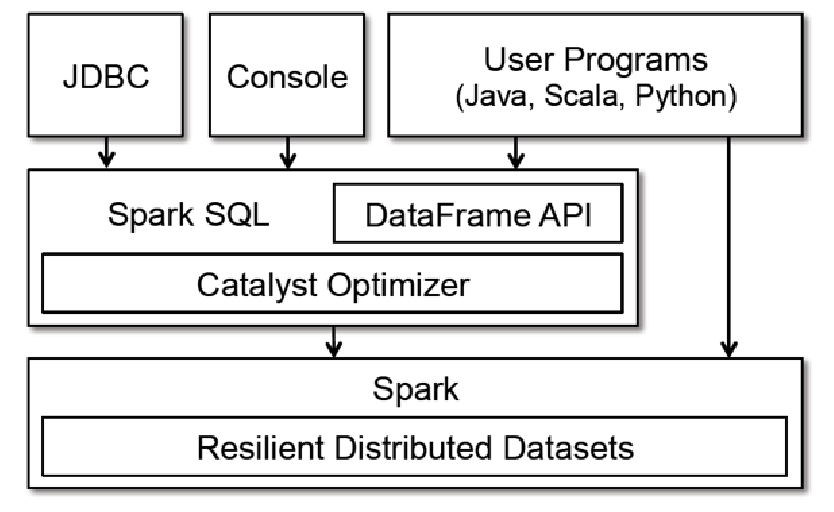
- Spark SQL is part of the core distribution since Spark 1.0 (April 2014)
- Spark SQL runs SQL and HiveQL queries together.
SQL DataFrame Operations
- Relational operations (e.g., select, where, join, groupBy) via a Domain Specific Language
- Operators take expression objects
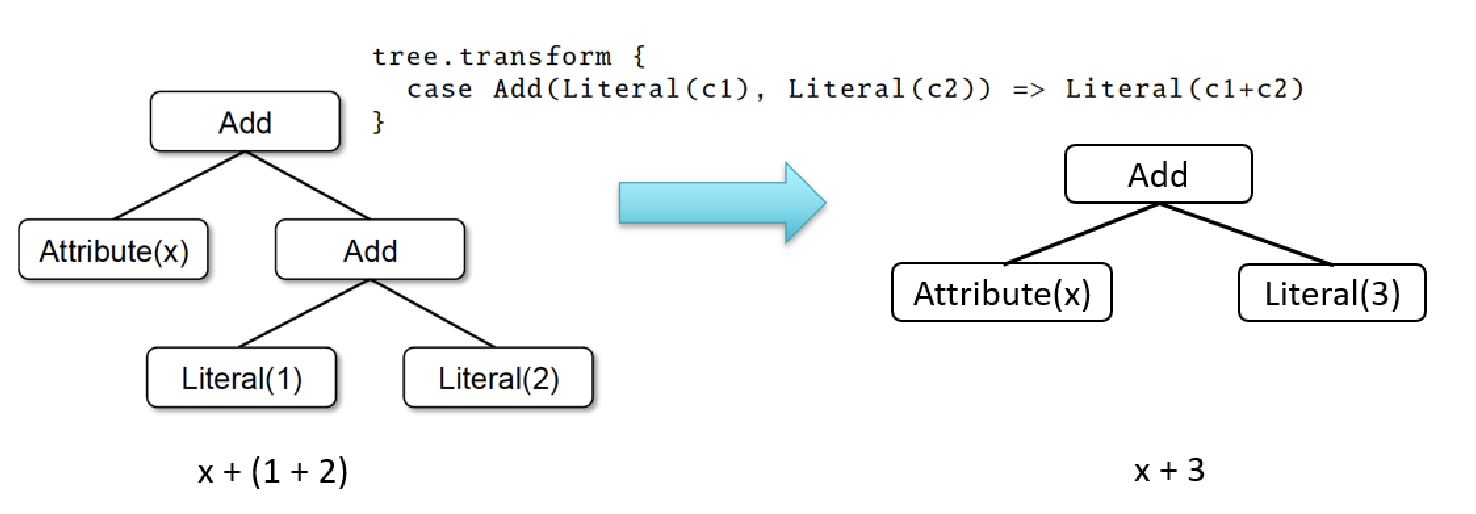
- Operators build up an Abstract Syntax Tree (AST), which is then optimized by Catalyst.
- e.g.
- display number of players with first name as “John”
from pyspark.sql.functions import col dataframe.where(col("first_name") == "John").count() - Create a Subset Dataframe from your Dataframe
subset_df = dataframe.select("first_name", "last_name", "age") subset_df.show(5) - Display unique values from a column in your dataframe
dataframe.select("LastName").distinct().show(10) - Filter records in your dataframe
from pyspark.sql.functions import col dataframe.select("nflId", "FirstName", "LastName") \ .where(col("FirstName" == "John")).show() - Convert SparkDataFrame into RDD and Vice Versa:
rdd = dataframe.rdd
updated_df = rdd.toDF()
- display number of players with first name as “John”
- How does Catalyst work?
Advantages over Relational Query Languages
- Holistic optimization across functions composed in different languages.
- Control structures (e.g., if, for)
- Logical plan analyzed eagerly → identify code errors associated with data schema issues on the fly.
RDD Operations
Transformations vs Actions
Transformations
Transformations are where the Spark machinery can do its magic with lazy evaluation and clever algorithms to minimize communication and parallelize the processing.
- Generate a new RDD from existing one
- Lazy/delay evaluation (not until an action performs): e.g. several transformations will be sent to catalyst optimizer, and it will not execute until an action. Actions are eagerly evaluated
- If a job is to create another RDD from the input data, it is a transformation
Actions
Actions are mostly used either at the end of the analysis when the data have been distilled down (collect), or along the way to “peek” at the process (count, take).
- Trigger a computation on RDD and do something with the results either returning them to the user (driver) or saving them to external storage
- Have immediate effect
Programming
Single RDD
Transformations:
| Transformation | Result |
|---|---|
| map(func) | Return a new RDD by passing each element through func. (Same Size) |
| filter(func) | Return a new RDD by selecting the elements for which func returns true. (Fewer Elements) |
| flatMap(func) | func can return multiple items and generate a sequence, allowing flattening nested entries into a list. (More Elements) |
| distinct() | Return an RDD with only distinct entries. |
| sample(…) | Various options to create a subset of the RDD. |
| union(RDD) | Return a union of the RDDs. |
| intersection(RDD) | Return an intersection of the RDDs. |
| subtract(RDD) | Remove argument RDD from other. |
| cartesian(RDD) | Cartesian product of the RDDs. |
| parallelize(list) | Create an RDD from this (Python) list (using a spark context). |
Actions:
| Action | Result |
|---|---|
| collect() | Return all the elements from the RDD. |
| count() | Number of elements in RDD. |
| countByValue() | List of times each value occurs in the RDD. |
| reduce(func) | Aggregate the elements of the RDD by providing a function which combines any two into one (sum, min, max, …). |
| first(), take(n) | Return the first, or first n elements. |
| top(n) | Return the n highest valued elements of the RDDs. |
| takeSample(…) | Various options to return a subset of the RDD. |
| saveAsTextFile(path) | Write the elements as a text file. |
| foreach(func) | Run the func on each element. Used for side-effects (updating accumulator variables) or interacting with external systems. |
Pair RDD
Key/Value organization is a simple, but often requires very efficient schema.
Spark provides special operations on RDDs that contain key/value pairs.
On the language (Python, Scala, Java) side, key/values are simply tuples. If you have an RDD all of whose elements happen to be tuples of two items, it is a Pair RDD and you can use the key/value operations that follow.
Transformation:
| Transformation | Result |
|---|---|
| reduceByKey(func) | Reduce values using func, but on a key-by-key basis. That is, combine values with the same key. |
| groupByKey() | Combine values with same key. Each key ends up with a list. |
| sortByKey() | Return an RDD sorted by key. |
| mapValues(func) | Use func to change values, but not key. |
| keys() | Return an RDD of only keys. |
| values() | Return an RDD of only values. |
Action:
| Action | Result |
|---|---|
| countByKey() | Count the number of elements for each key. |
| lookup(key) | Return all the values for this key. |
Two Pair
| Transformation | Result |
|---|---|
| subtractByKey(otherRDD) | Remove elements with a key present in other RDD. |
| join(otherRDD) | Inner join: Return an RDD containing all pairs of elements with matching keys in self and other. Each pair of elements will be returned as a (k, (v1, v2)) tuple, where (k, v1) is in self and (k, v2) is in other. |
| leftOuterJoin(otherRDD) | For each element (k, v) in self, the resulting RDD will either contain all pairs (k, (v, w)) for w in other, or the pair (k, (v, None)) if no elements in other have key k. |
| rightOuterJoin(otherRDD) | For each element (k, w) in other, the resulting RDD will either contain all pairs (k, (v, w)) for v in this, or the pair (k, (None, w)) if no elements in self have key k. |
| cogroup(otherRDD) | Group data from both RDDs by key. |
Top-N Example
lines_rdd = scl.textFile("inputData.txt")

# Count the number of lines
lines_rdd.count()

# Number of words
words_rdd = lines_rdd.flatMap(lambda x: x.split())
words_rdd.count()

# Number of distinct words
words_rdd.distinct().count()

# Count the occurrences of each word
key_value_rdd = words_rdd.map(lambda x: (x, 1))
word_count_rdd = key_value_rdd.reduceByKey(lambda x, y: x + y)

# find top-n frequent words
flipped_rdd = word_count_rdd.map(lambda x: (x[1], x[0]))
sorted_rdd = flipped_rdd.sortByKey(False)
Combine all in one:
results_rdd = lines_rdd.flatMap(lambda x: x.split()).map(lambda x: (x,1))
                        .reduceByKey(lambda x,y: x+y)
                        .map(lambda x: (x[1],x[0])).sortByKey(False)
Extra Reading
Spark SQL, Dataframe and Dataset Guide
Last modified on 2025-12-01