Brief Intro to Cloud
What is Cloud
-
In simple words, Cloud = SCN (Lots of Storage + Computer C(omputation)ycles nearby + Network bandwidth)
-
In the industry, “Cloud” refers to large Internet services running on 10,000s of machines (Amazon, Google, Microsoft, etc.)
-
To be specific, Cloud is a model that offers following characteristics:
- On-demand self-service: no human intervention needed to get resources
- Broad network access: access from anywhere
- Resource pooling: provider shares resources to serve multiple consumers
- Rapid elasticity
- Measured service
- Multi-tenancy
Why Cloud
Three main reasons:
- Accessibility
- Big data
- Cost efficiency
Cost saving
Cloud cost savings in different scenario based on the scale of business:
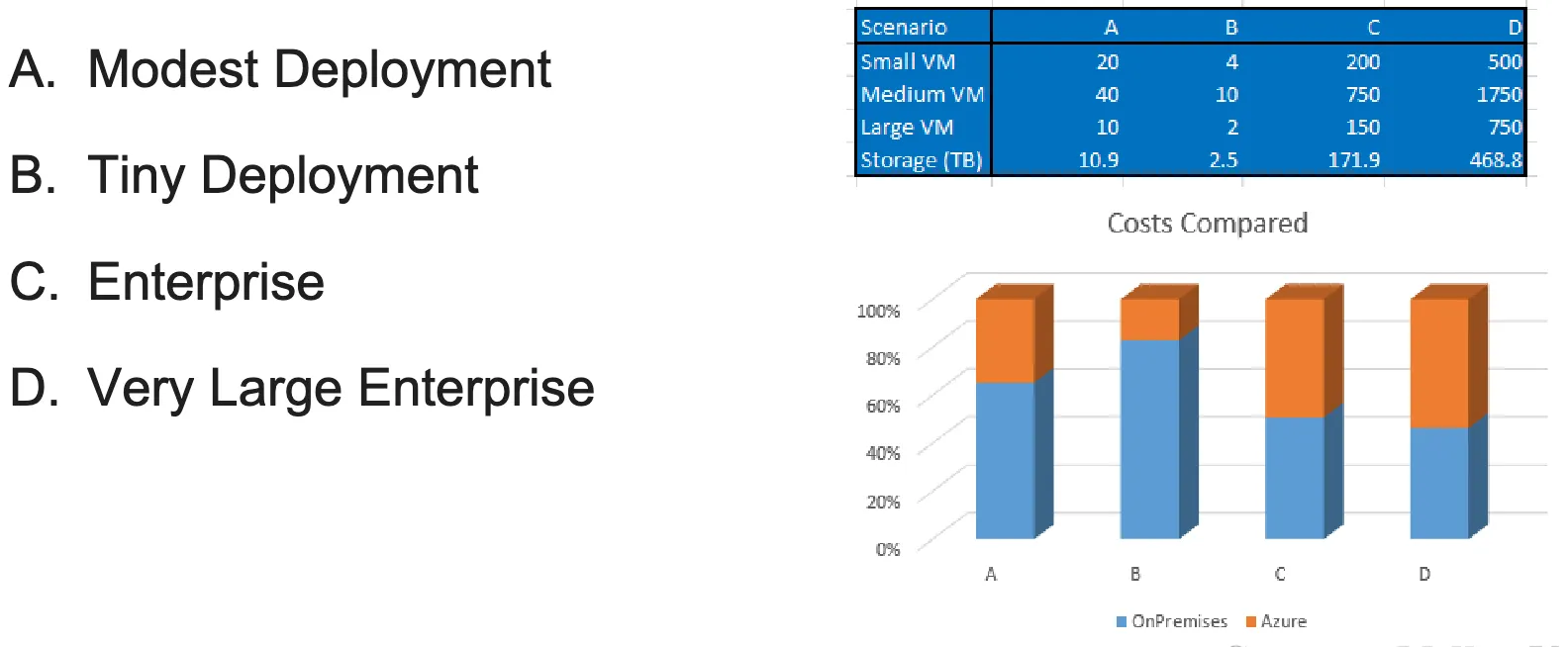
- The smaller the scale is, relatively cheaper the cloud is. So it is most attractive to tiny deployment
- A tricky point: When you are a B or A in the image, service provider give you many free tools to use and make you rely on these tools more and more as you grows up. When the scale rises to C and D, it becomes too hard to migrate to on-premises since, not only data, but structures, designs all need to be changed.
- Cloud actually cost an extra Risk Management expense within the operational expenses, and in the long run it can outweigh Capital expenses.
Cloud Computing Service Model
We focus on the third-party-provided service only:
- Software as a Service (SaaS)
- Platform as a Service (PaaS)
- Infrastructure as a Service (IaaS)
- Metal as a Service (MaaS)
We define the resources that users or service providers manage as follows:
Application,Data,Runtime,Middleware,OS,Virtualization,Servers,Storage,Networking
Software as a Service (SaaS)
- In this case, you as a user do not care about how it is deployed, how data structured, or who’s the cloud provider. Here on-demand software is the provided service, and user has the least control over it. They have no control of the hardware and system.
- Most applications can be run directly from web browser.
- This is the largest cloud market
- Resource users manage: NA
- Examples: Google Apps, Oracle’s Netsuite, SAP’s Concur, Cisco WebEx, GoToMeeting
Platform as a Service (PaaS)
- Provides computing platforms which typically includes operating system, programming language, execution environment, database, web server, etc. to build cloud applications.
- Applications using PaaS inherit cloud characteristic such as scalability, high-availability, multi-tenancy, SaaS enablement, and more.
- Salesforce for example, the user can actually build application on the platform, so it is not just consumer but also service provider. So somehow the user gets access to the cloud service provider.
- Compared to IaaS: Provide a lot of development tools such that you can build up a system fast and easily, and as a trade-off, you developed apps using their specific APIs, making it or impossible to migrate (”be lock-in”)
- Resource users manage:
Application,Data - Examples: Google App Engine, AWS Elastic Beanstalk, Salesforce.com, Amazon EMR, MS Azure HDInsight, GCP Dataproc
Infrastructure as a Service (IaaS)
- Offers storage and computing resources that developers and IT organization use to deliver custom business solutions
- User directly works on cloud service like GCP, without third party in between, and creates virtual machine (own service) upon it. And the user still does not know how exactly the physical layer is formed, how the SCN are composed.
- Resource users manage:
Application,Data,Runtime,Middleware,OS - Examples: Amazon EC2, Google Compute Engine (GCE), VMWare vCloud
Metal as a Service (MaaS)
- Combines the flexibility and scalability of the cloud with the ability to harness the power of physical servers.
- It still uses SCN, but the user knows underlying physical hardware structure, like port number, get control of physical devices. Pretty much the same as how private cloud works (the main function is the same) but not exactly. You do not own the land & physical space used to store the machine, the cooling system, the surveillance system (security) etc, surrounding the machines. (Don’t need to care about peripheral services)
- Resource users manage: Everything
- Example: Juju
PaaS or IaaS?
- Vendor Lock-in: the ability to use “what you manage” in cloud env with different cloud providers.
- PaaS: Low portability, high lock-in risk by requiring users to develop apps based on their specific APIs. Hard to switch to other vendor.
- Development tools:
- PaaS: Provide a set of development tools to build app fast and easily.
- Still, it is another trick for vendor lock-in.
Cloud Computing enablers:
= Data Center (hardware) + Virtualization (software, the layer allows you to create SCN, aka the resource pool)
Last modified on 2025-11-21