Hadoop - YARN
Yarn
Brief History
Hadoop 1.x
- Core components: MapReduce and HDFS
- Structure:
HDFS: NameNode + DataNodes MapReduce (MRv1): JobTracker + TaskTrackers- JobTracker did everything: resource management, job scheduling, tracking tasks, failure handling
- Also a single point of failure and a scaling bottleneck
- MapReduce = computation engine + resource manager in one
- Only
MapReducejobs were supported
- JobTracker did everything: resource management, job scheduling, tracking tasks, failure handling
Hadoop 2.x
- Now
Hadoophas three logical layers:HDFS: storage layer NameNode + DataNodes YARN: resource management layer ResourceManager + NodeManagers + ApplicationMasters MapReduce (MRv2): computation layer Runs on top of YARN as one of many application frameworks - Key improvements
- Separated resource management from computation
- MapReduce no longer monopolizes the cluster
- Allowed more engines: Spark, Tez, Flink, Storm, etc.
- Better scalability and cluster utilization
Hadoop 3.x
- Structure:
Namespace Federation: Multiple NameNodes managing independent namespaces Shared pool of DataNodes YARN: Handles multi-framework distributed scheduling - Improvements:
- Federation & NameNode high availability improvements
- Erasure coding (reduces replication overhead)
- More NameNodes with shared DataNodes (HDFS federation)
Definition
- Yet Another Resource Negotiator
- It is the orchestrator of the Hadoop MapReduce jobs starting from Hadoop 2.x.
- As the amount of data increases and 4k nodes are not enough, starting from 2.x. the two main components of Hadoop changed from MapReduce and HDFS to Yarn and HDFS.
Daemons
: provides resource management
Two Long Running
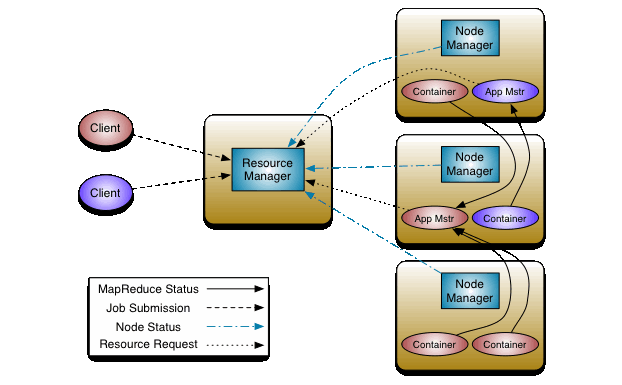
- Resource manager - 1 / cluster
- Scheduler + ApplicationsManager
- Manages resource and schedules across the cluster, especially large clusters
- runs on Master node
- Node managers - 1 / node, similar to
kubectl- launches and monitors job containers
- runs on worker nodes
Dynamic Components
(They are only created when a job have to run)
-
Daemons create two main types of Yarn components:
- Containers (to host tasks)
- Created by the RM upon request
- Runs with a certain amount of resources (memory, CPU) on a worker node
- An application can run as one or more tasks in one or more containers.
- MapReduce Application Master (MRAppMaster)
- One per application
- Framework/application specific
- Requests more containers to run application tasks
- Containers (to host tasks)
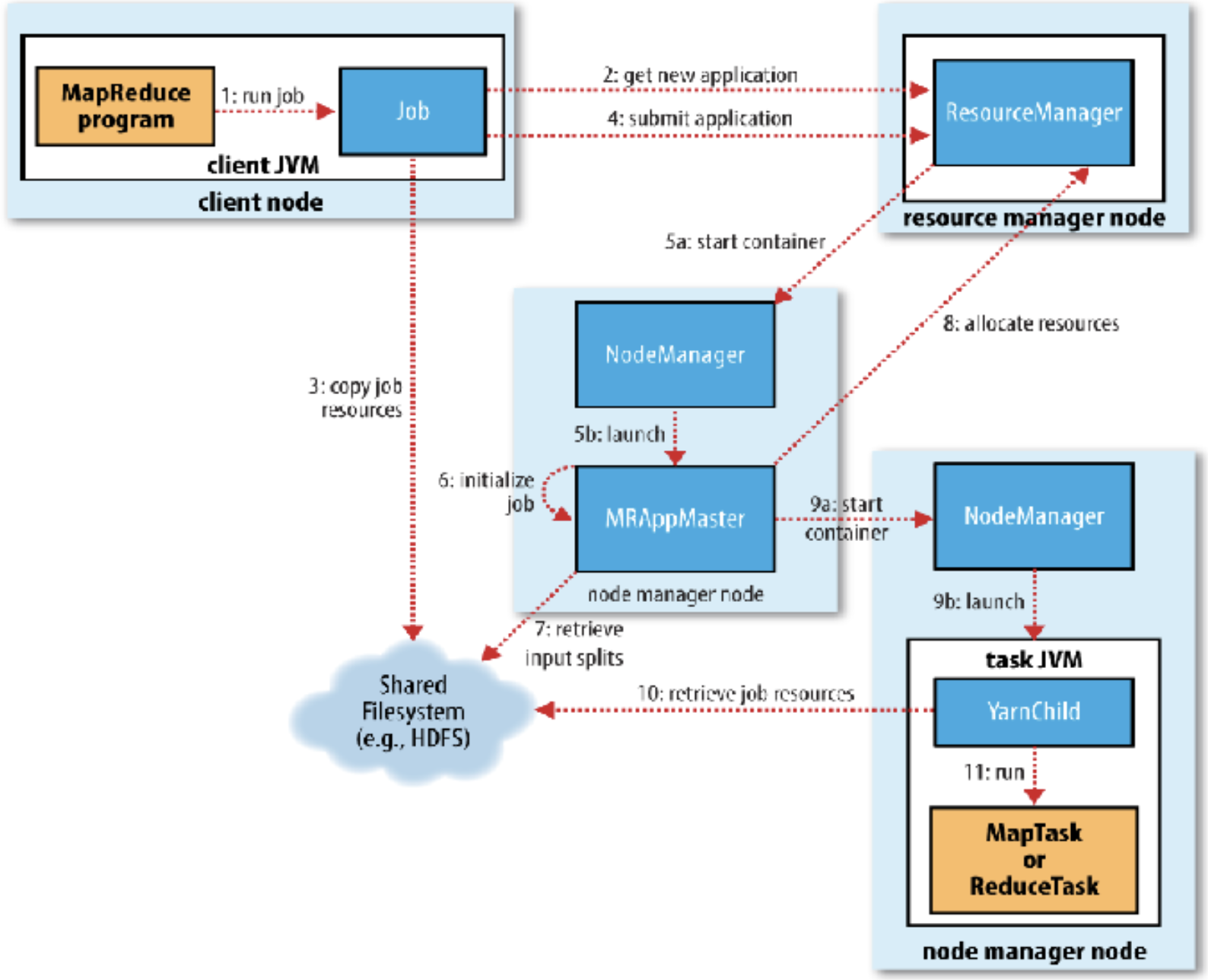
Anatomy of MapReduce job
5 Phases:
- Job Submission
- MRAppMaster Initialization
- MapReduce Job Initialization
- MapReduce Task Execution
- Job Completion
Job submission
-
step 1-4
-
When you run MapReduce Job, it creates an internal JobSubmitter instance and calls
submitJobInternal(). This function does the following:- submit python code, a library convert it to a java file
- Asks the RM for a new
**App ID**, used as MapReduce Job ID (step 2) - Checks the job configurations, i.e., output, input paths, etc before it copies anything (like if there existing the same output folder) as a part of job submission
- Compute input splits from block information returned from RM
- Copies the resources needed to run the job to the shared file system (step 3)
- Job jar file (or source files), configuration file, input splits(when the input is small)
- Submits the job by calling
submitApplication()on the RM (step 4)
MRAppMaster Initialization
- Step 5a, 5b
- RM receives a call to
submitApplication()and hands off the request to the YARN scheduler - The scheduler allocates a container
- scheduler is very parallel and close to the resource manager and people sometimes consider them as the same thing
- The RM launches the MRAppMaster Process through the Node Manager (step 5a, b)
MapReduce Job Initialization
- by AppMaster: Step 6, 7, 8
- MRAppMaster initializes the MapReduce job by creating bookkeeping objects to keep track of the job’s progress (step 6)
- Retrieves the input splits (not copying, but retrieving their locations) computed in the client from the shared file system (step 7)
- Decides how to run the tasks
- Example of resource request:
- Resource name (hostname, rack)
- Priority (within this application, usually map task is higher)
- Resource requirements: memory, CPU, etc
- Number of containers
- Subtopics:
- IF the tasks are small?
- MRAppMaster will run the task in the same memory as itself - Uberization: uber the data from HDFS to the memory as the file size is small.
- Because Overhead of allocating and running tasks in the new containers outweighs the parallel computation benefit
- Small job: less than 10 mappers, one reducer, and input size < the size of HDFS block
- If the tasks are big?
- If the job is not uberized, MRAppMAster requests containers for all the map and reduce tasks from the RM.
- Request specifies:
- Priority (map > reduce)
- Memory (default 1GB)
- CPU (default 1 virtual core)
- Map tasks are assigned based on data locality
- IF the tasks are small?
MapReduce task execution
- Implemented for Each Task in the job(step 9ab - 10)
- Example of Launch context:
- Container ID
- Commands (to start the app)
- Environment( configuration)
- Local Resources (app binary, HDFS files)
- Once a request is fulfilled – a container on a particular node is assigned to a specific task. (Step 9a)
- MRAppMaster starts a MapReduce application whose main class is YarnChild in that task via the Node Manager (Step 9b)
- Localizes the resources needed by the tasks including the job configuration and the source file(s) (Step 10)
- Requests for reduce tasks are not made by RM until 5% completion of map tasks
MapReduce Job Completion
- Once the MRAppMaster receives a completion notification from the last task, it changes the job status to “successful” (the _Success file in the output folder on GCP)
- Job polls for status and learns that the job has completed successfully
- MRAppMaster prints a message, some statistics, and counters to the console
- MRAppMaster and its tasks clean up their working state
Edit YARN Daemon Config
- Check the
hadoop.envfile and look for YARN configurations starting from line number 11. - Can change things like:
- Your scheduling algorithm that defines the priority of execution for your job tasks. By default, it uses Capacity Scheduler.
- Whether your data should be compressed
- Memory allocated for your resource manager, your node manager, etc
- The minimum and maximum size of your input split by adding
-D mapred.min.split.size-D mapred.max.split.size(to control the number of mappers that will be created)
Spark on Yarn: Client mode
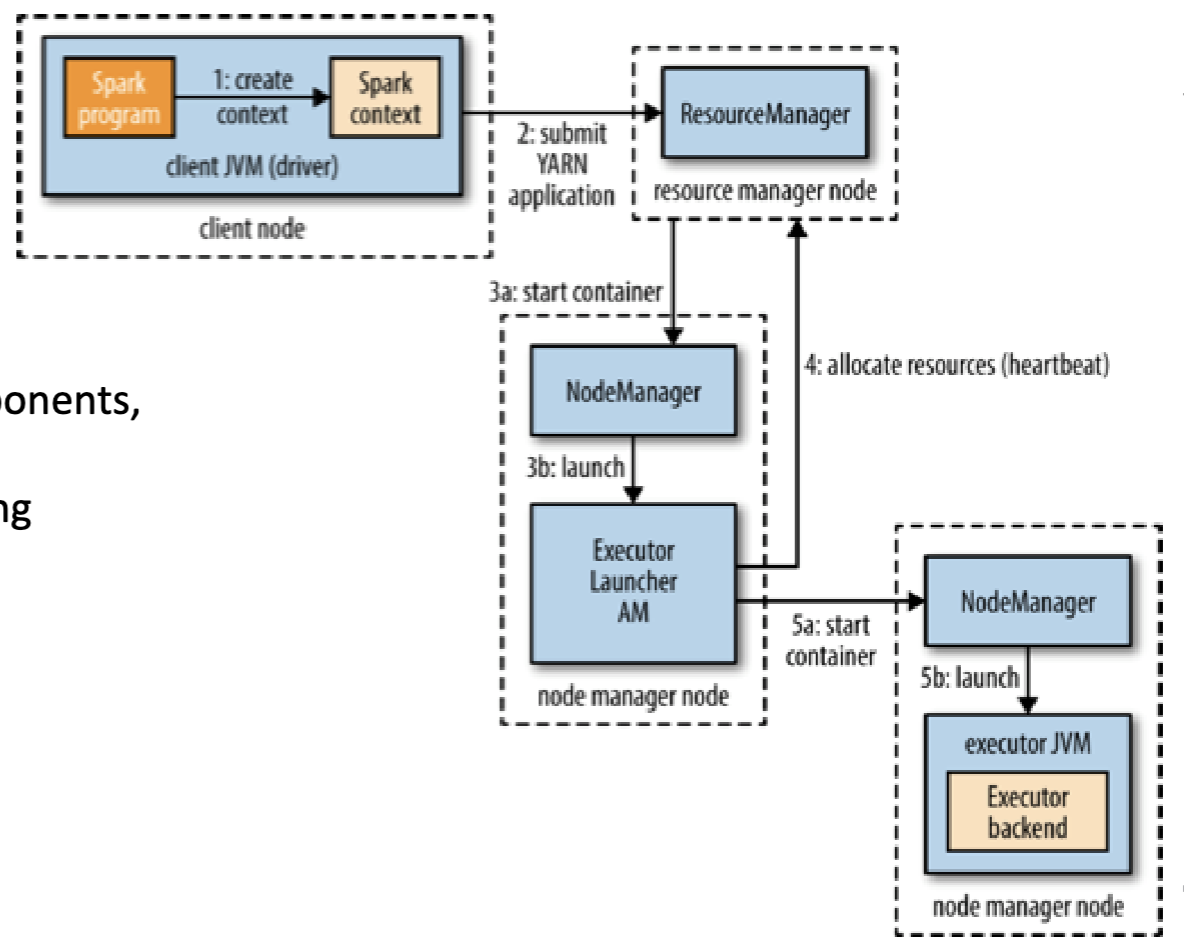
- Because the driver runs on a client, so it requires:
- interactive components like spark shell or pyspark
- good for debugging and testing
- The driver runs on the cluster in the YARN application master
- The entire of program runs in the cluster
- production jobs
Reading
Last modified on 2025-11-29