Hadoop - HDFS
Intro
Motivation for Hadoop
- Handle big data! that exceeds single machine’s storage and computing capacity
- Storage and Analysis
- Storage capacity increases faster than then access speeds.
- Need parallel data access to get things done quickly
- 1 machine accessing 1000 GB is much slower than 100 machines, each is accessing 10 GB.
- Shared access for efficiency and scalability
Challenges
- Analysis tasks need to combine data from multiple sources
- Need a paradigm that transparently splits and merges data
- Challenge of parallel data access to and from multiple disks
- Hardware failure
Why Hadoop
- We need Open-source software framework for storing data and running applications on clusters of commodity hardware -> Hadoop is cheap to implement and expand
- Provides massive storage for any kind of data, enormous processing power and the ability to handle virtually limitless concurrent tasks or jobs -> Hadoop is scalable
Hadoop Basics
Component Architecture
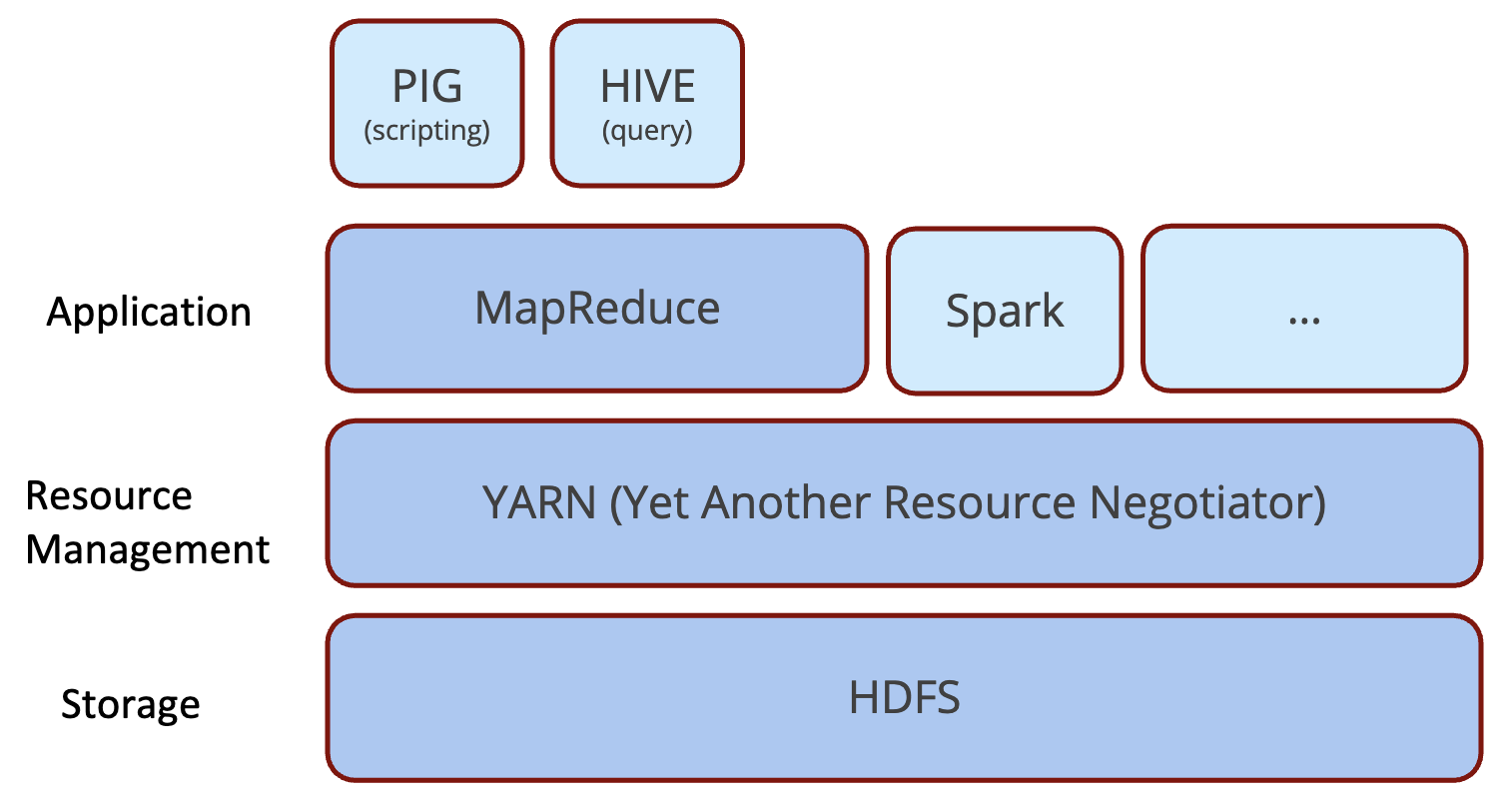
- HDFS: Hadoop Distributed File System
- Designed to provide highly fault-tolerant and to be deployed on low-cost hardware
- MapReduce: A framework for processing data in batch -
BSP(Bulk Synchronous Parallel)- Enables distributed processing of large data sets across clusters of computers using simple programming models
History
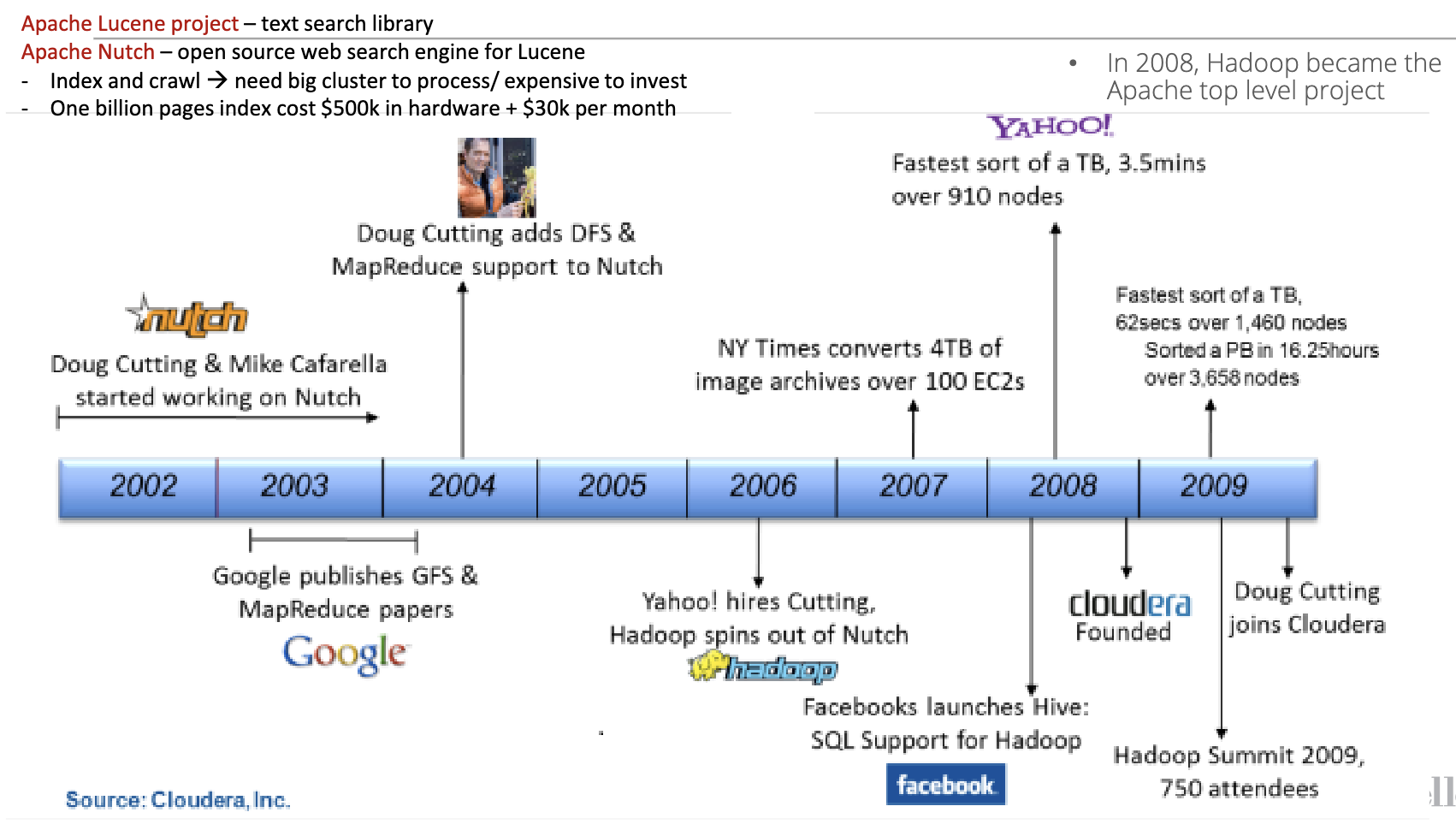
HDFS
Distributed File System
- A client/server-based application that allows clients to access and process data stored on the server as if they were on their own computer
- Client/Server arch: Clients request services and resources from a centralized server. Client drives the interaction.
- Master/Worker arch: Master node controls and manages the worker nodes. Master coordinates and distributes jobs; workers execute computation.
- More complex than regular disk file systems: network based and high level of fault tolerance
- Main motivation: BIG DATA: datasets outgrows the storage capacity of a single physical machine, so data are partitioned across separate machines
Basics
- HDFS is a file system designed for storing very large files with streaming data access patterns, running on clusters that are using commodity hardware.
- Very large files: files are normally hundreds of megabytes, gigabytes, or terabytes in size.
- Streaming data access: HDFS is designed more for batch processing, a write-once, read many-times pattern
- Commodity hardware: node failure probability is high, so we need a mechanism that tolerates failures without disruption or loss of data.
Structure
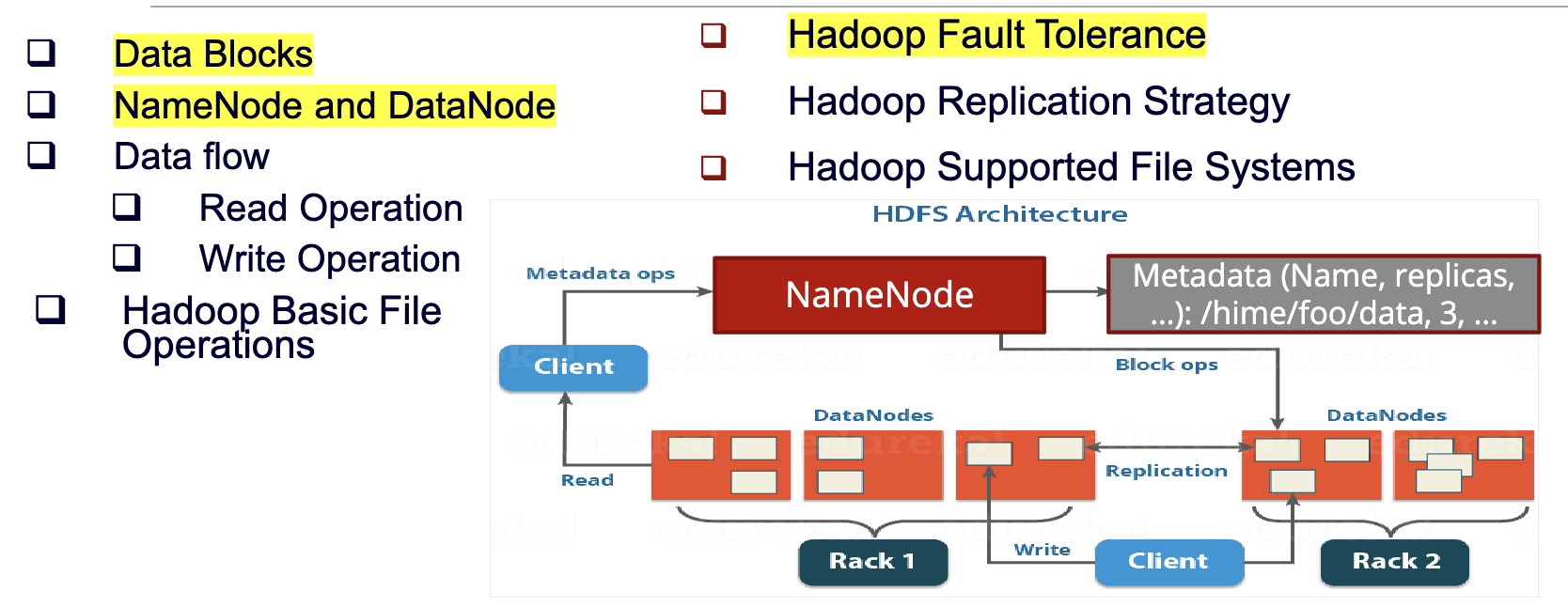
Namenode(master)
- Maintains the file system tree and the metadata for all the files and directories in the tree. Store persistently on the local disk in the form of two files: the namespace image and the edit log()
- Namespace image aka fsimage: the entire HDFS directory tree and block locations, representing all metadata at a point in time
- Edit log: a transaction log that records every change that occurs to the file system metadata after the fsimage snapshot
- When a fail happens, we create a new Namenode and try to make it into the same state of previous nodes before failure using the two data above.
- Services block location requests from clients
- The entire
(block, datanode)mapping table is stored in memory, for efficient access.Namespace image(akafsimage) loaded into RAM on startup of Namenode. - To deal with the great amount of log data writing into the
edit log, the Namenode periodically merges theedit logwith thenamespace imageto create a newnamespace image, and clears theedit log- Done by
secondary namenodeorcheckpoint node
- Done by
- Namenode 内部的i/O操作如写日志、快照是异步的,多个客户端写操作可批量处理,bing发请求通过 RPC 队列 + 多线程处理,提升吞吐。
- High availability mechanism: 生产集群一般启用 Active / Standby NameNode;共享 EditLog(通常存储在 JournalNodes 上);当 Active NameNode 压力过大或宕机时,Standby 可自动接管。
- For scalability issue, we introduce Namenode Federation by adding more namenodes. Each namenode manages a portion of the file system namespace.
Datanode
- Stores HDFS file
blocksas independent files in the local file system - Handles client read and write operations
- Maintains the block location info by sending heartbeats and block reports to the Namenode periodically
- Re-replicates blocks when instructed by the NameNode
Data Blocks
- Why streaming data?
- Since we want the cost to write is very cheap, the cost of hardware is cheap. Too cheap to do multiple write on the same location
- Streaming data access allows us to optimize for high throughput of data access, rather than low latency of data access
- Why large files?
- Unlike mechanical disks, the
blocksize in HDFS is 128MB by default, such that the head of the disk do not need to switch so often between different block to read the same file. In this way it minimizes the cost of seek time(the time to move the head assembly to the correct cylinder) <=1% of the disk transfer time - Files in HDFS are broken into block-sized chunks, which are stored as independent units. If the size of the file is less than the HDFS block size, the file does not occupy the complete block storage
- Unlike mechanical disks, the
Architectural Layers
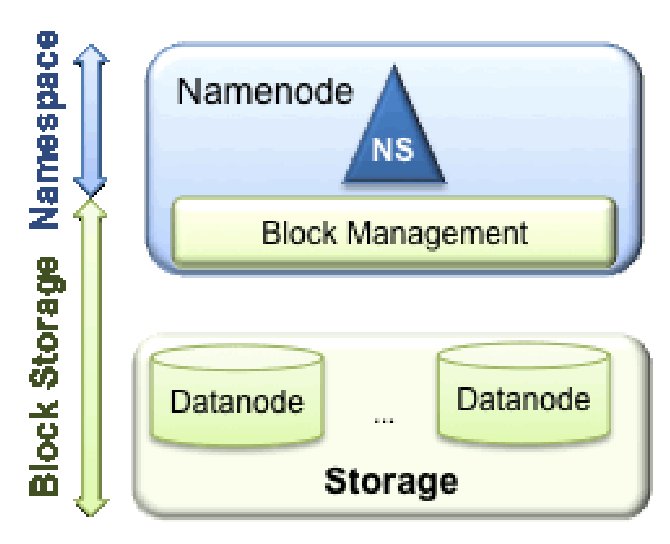
- Storage Layer (
DataNodes)
- Stores the actual file blocks.
- Equivalent to the “hard drive” layer.
- Distributed across many machines.
- Metadata Layer (
NameNode)
- Stores namespace metadata: directories, filenames, permissions, block maps.
- Equivalent to the “file system brain”.
- Coordination Layer (
Secondary/CheckpointNodes)
- Merges fsimage + edit logs
- Keeps NameNode healthy and restartable.
- Client Layer
- Users and applications interacting with HDFS.
Namespace
- Consists of directories, files and blocks.
- Supports all the namespace related file system operations such as create, delete, modify and list files and directories.
Block Storage Service
- Block Management - performed in the
Namenode- Provides
Datanodecluster membership by handling registrations, and periodic heart beats. - Processes block reports and maintains location of blocks.
- Supports block related operations such as create, delete, modify and get block location.
- Manages replica placement and block replication.
- Provides
- Storage - provided by
Datanode, mentioned above: HDFS - structure - Datanode
Namenode Issues
- Namenode maintains a single namespace and metadata of all the blocks for the entire cluster
- Not scalable: the entire namespace and block metadata are stored in memory
- Poor isolation: there is no way to separate a group of works from one another
- Namenode is the main component to make filesystem operational. If it fails, the whole cluster will not function
Solutions
- Namenode Federation - For scalability - Hadoop 3.x:
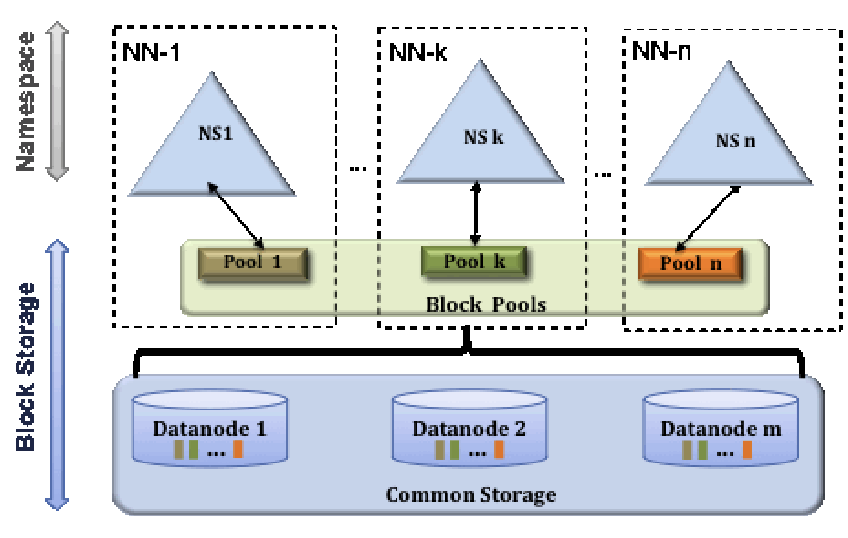
- introduced in the 2.x Hadoop release to address scalability issues by adding more Namenode(s)
- Each Namenode manages a portion of filesystem
namespacewhich is independent from other portions handled by other Namenodes. - Separate the namespace into many small namespaces and dedicated by the master namespace that holds the
viewFStable (mount table) such that they know a folder is maintained by which namespace. Each namespace belong to a namenode, and each namespace can be communicating with several datanodes.HDFS Federationsplits thedirectory tree:/user → namespace A /data → namespace B- There is a top-level ‘virtual’ namespace that acts like the master router. It doesn’t store data—it only stores a mount table:
This master namespace uses ViewFS to route requests to the correct NameNode. So When you access/user → maps to namespace A (NameNode A) /data → maps to namespace B (NameNode B)/data/file1, the ViewFS mount table recognizes: →/databelongs to Namespace B → send request to NameNode B.
- Each Datanode will register with each Namenode to store blocks for different namespace. Each NameNode is allowed to talk to any DataNode.
- Full structure:
    +-----------------------+
    |     ViewFS (mount)    |
    |  "/user" → NN1        |
    |  "/data" → NN2        |
    +-----------------------+
    /           |            \
    NN1         NN2           NN3    (many namespaces)
    / \         / \           / \
DN1 DN2     DN1 DN3       DN2 DN3  (shared DataNode pool)
- Namenode Fault Tolerance - For failures
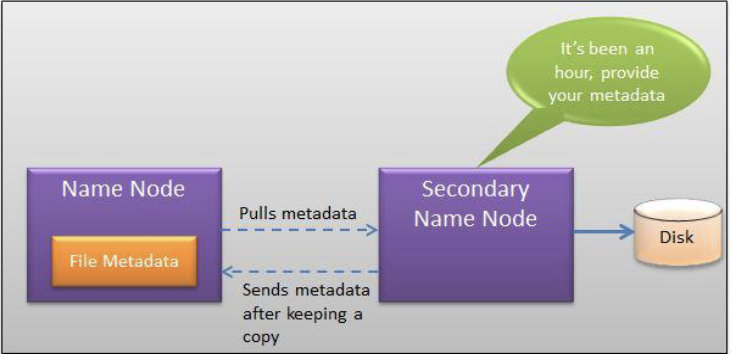
- Periodically (hourly) pulls a copy of the file metadata from the active
Namenodeto save to its local disk - Problem: Secondary Namenode might take too long to come up online (more than 30 minutes):
- Load the namespace image into the memory
- Replay its edit log
- Receive enough block reports from the Datanodes to leave safe-mode
- Periodically (hourly) pulls a copy of the file metadata from the active
- Namenode Fault Tolerance - High Availability (HA) Configuration - Hadoop 3.x
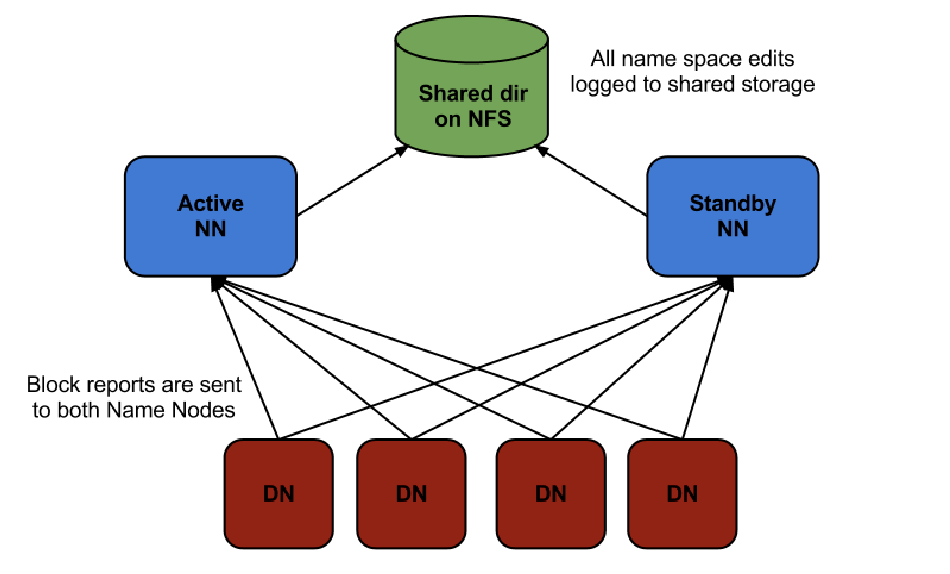
- A pair of NN is configured as active-standby
- The standby takes over whenever the active one fails
- The Namenodes use highly available shared storage to share the edit log
- The active Namenode writes, and the standby Namenode reads to keep it in sync
- Datanodes must send block reports to both Namenodes
- Client must be configured to handleNamenode failover
Datanode failure
- Datanode Fault Tolerance - Replication Factors
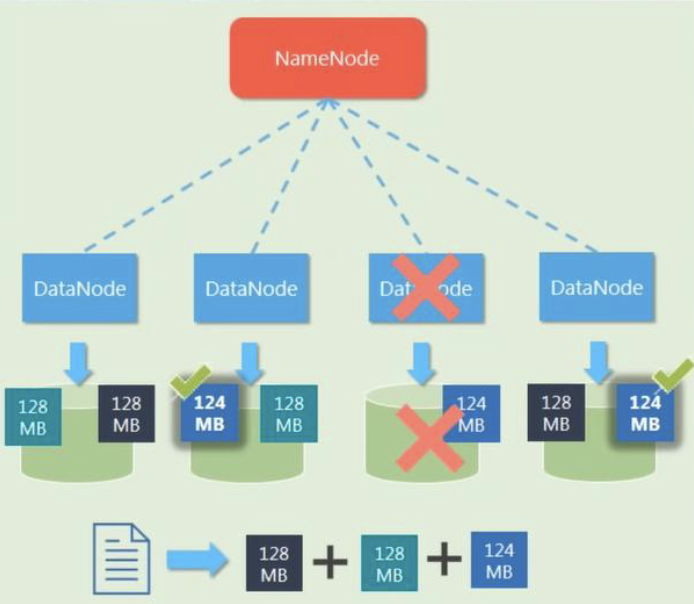
- Each data blocks are replicated (thrice by default) and are distributed across different DataNodes.
Key Takeaways
- HDFS is for high thoughput, not low latency.
- Not for a large number of small files but for large files
- Large number of small files: Costly metadata
- In average, each file, directory, and block takes about 150 bytes. For a HDFS that maintains 1 million files with one block each will need memory – 1,000,0001502 = 300 MB
- Is for applications with single writer and always make writes at the end of file
Last modified on 2025-11-29